 ZigBeeForDomoticZ plugin Wiki
WebUI : Settings
The Settings menu of the WebUI lets you view and change the plugin settings.
How the page works
Plugin 9.1.010 and later. This section describes the Settings page available since plugin 9.1.010. In 9.1.009, a list on the left shows one theme at a time, an Advanced settings switch shows every setting, and Changes to save sits on the right; the rest works as below. In older versions, all the sections are shown one below the other, the changes are saved with Validate, and Settings (default) puts every setting back to its default.
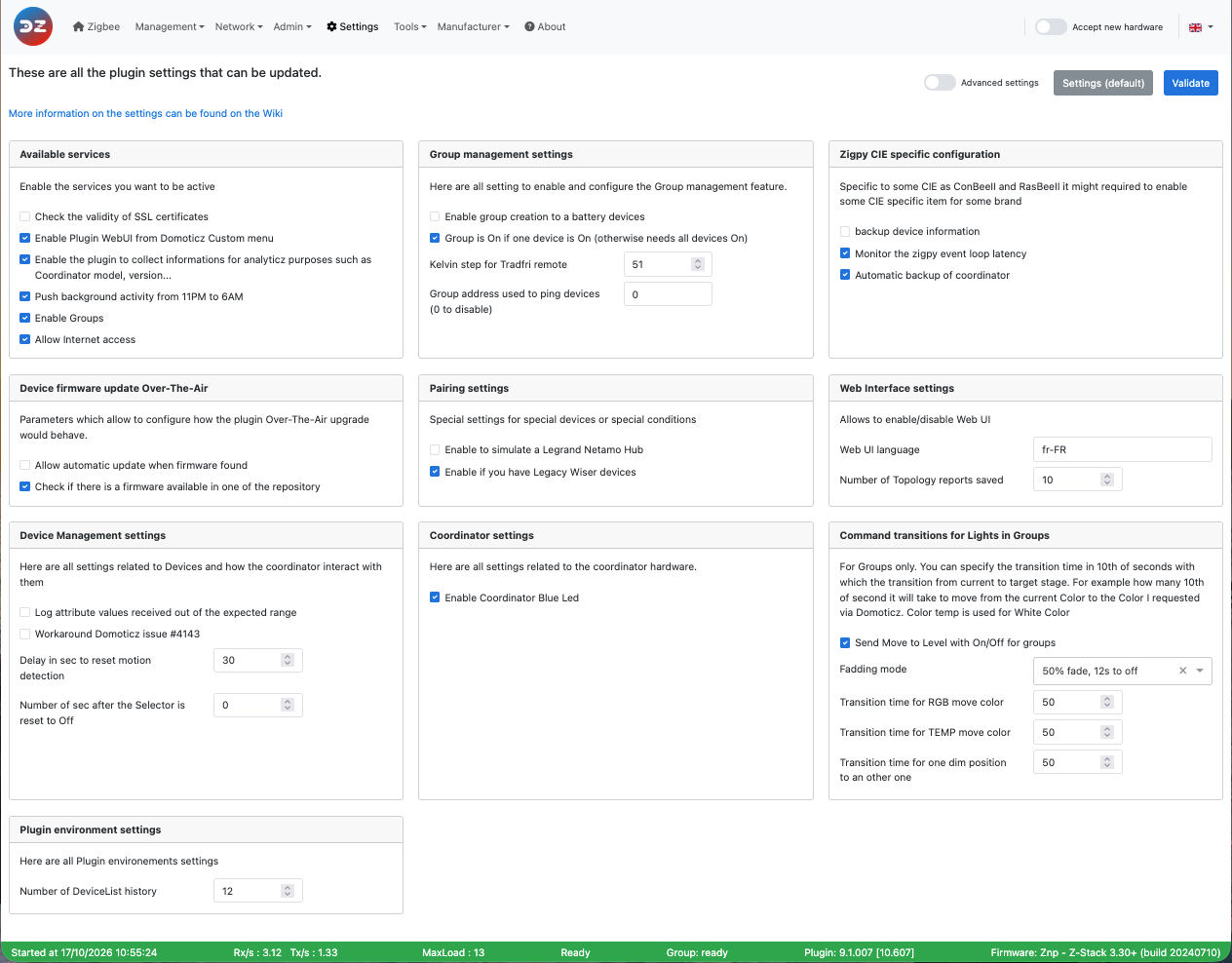 This picture may have changed since this documentation was written.
- The settings are grouped by theme, the sections below. The buttons under the search box show one theme at a time; a number on a theme tells how many of its settings you changed and haven’t saved yet.
- Inside a theme, the settings are split into cards by subject (for example Internet and privacy, Domoticz, Features and Device ping in Available services). When a theme has four cards or more, In this section: links to each card.
- Essentials / All settings chooses what is shown. Essentials shows the main settings, and folds the advanced ones (the Advanced parameters tables below) at the bottom of each card: Show advanced settings (N) opens them for that card. A card with only advanced settings shows Advanced settings: N and a Show link. All settings shows every setting. A setting you changed always stays shown. Your browser remembers the choice.
- Search all settings finds settings by name or by their text, in every theme. Two filters work the same way: Changed from default (with the number of settings that differ from their default) and Needs a restart. While a search or a filter is on, the page lists the matches of every theme, under Settings matching “…”: N (search) or Settings shown: N (filters only); Clear search and filters goes back to the theme.
- Each setting shows its text and tags: Advanced (in All settings), Applied once, at the next start (one-time resets), and what a change requires: Restart (plugin restart), Coordinator reset or Erase PDM. Its name in the plugin, the one used in the tables below, shows in search results and when you hover its text. A number shows its allowed range and unit.
- Some settings only appear when the setting they depend on is enabled, or when you changed them. With Enable Groups off, the Group management settings and Command transitions for Lights in Groups themes are not shown at all.
- Settings that can stop the plugin from starting, or make you pair every device again, are kept apart in a red Handle with care card at the end of their theme, folded: Show opens it. It also opens by itself when one of its settings has an unsaved change, and in search and filter results. Saving a change to one of them asks for a confirmation (Save anyway).
- When a value differs from the default, the default is shown under it, with a reset link that puts the default back.
- As soon as a setting is changed, a bar at the bottom of the page shows Unsaved changes: N and what saving implies: how many of the changes need a plugin restart or, when a change needs more, that the coordinator must be reset, or its memory erased and all the devices paired again. Review lists each change with its old and new value. Save (N) saves them, Discard drops them. A value that is not valid (red field) blocks the saving.
- Reset all settings to defaults puts every setting back to its default, except the folder paths. Nothing is saved until you click Save.
- After Save, a pop-up tells you what is needed:
- Plugin Reload: restart the plugin (Admin > Plugin > Restart…). The Restart needed indicator of the menu bar also shows that a restart is pending.
- Coordinator Reset: the coordinator must be reset (for example after a channel change).
- Erase PDM: the Zigbee network must be created again, and all devices paired again.
- Every setting on the wiki opens this page.
- A few settings only appear with a given coordinator family (for example Silicon Labs EZSP or Texas Instruments ZNP); they are noted below.
- The debug and logging options are not on this page: they are in Tools > Debug, see Debug mode.
- The settings are saved in
Conf/PluginConf-XX.json in the plugin folder (XX is the hardware idx of the plugin in DomoticZ), with a copy in the DomoticZ database.
- The hardware parameters of the plugin (coordinator model, serial port, WebUI port…) are not here: they are in the DomoticZ hardware page, see Plugin settings.
The tables below list every setting visible in the WebUI, with its name in the plugin and the text shown in the WebUI. The Restart column tells what a change requires (empty: the change applies immediately).
Available services
Enable the services you want to be active
Parameters
Setting
Shown in the WebUI as
Default
Unit / values
Restart
Notes
MatomoOptInEnable the plugin to collect informations for analyticz purposes such as Coordinator model, version…
on
See Plugin statistics for what is sent.
enablegroupmanagementEnable Groups
off
plugin restart
See Group Management.
enableNativeScenesEnable native Zigbee scenes
off
plugin restart
Needs Group Management and a zigpy coordinator.
GreenPowerEnableAccept Green Power devices when pairing is open
off
Not offered on Texas Instruments (Z-Stack) coordinators, which cannot receive Green Power frames directly.
internetAccessAllow Internet access
on
plugin restart
Used to check for plugin and firmware updates, to update the certified devices database and for OTA firmware repositories. It doesn’t control the statistics.
DomoticzCustomMenuEnable Plugin WebUI from Domoticz Custom menu
on
plugin restart
See Plugin integration.
NightShiftPush background activity from 11PM to 6AM
off
Advanced parameters
Setting
Shown in the WebUI as
Default
Unit / values
Restart
Notes
CheckSSLCertificateValidityCheck the validity of SSL certificates
off
plugin restart
pingDevicesPing main-powered devices regularly to vérify their health
on
plugin restart
How often: pingDevicesFeq.
pingDevicesFeqFrequency of regular ping main-powered devices
3600s (300–86400)
Group management settings
Here are all setting to enable and configure the Group management feature.
Parameters
Setting
Shown in the WebUI as
Default
Unit / values
Restart
Notes
GroupOnBatteryEnable group creation to a battery devices
off
OnIfOneOnGroup is On if one device is On (otherwise needs all devices On)
on
Advanced parameters
Setting
Shown in the WebUI as
Default
Unit / values
Restart
Notes
forceGroupDeviceRefreshRefresh the widgets of all group members after a group command
on
reComputeGroupStateRecompute the group state regularly
on
allowGroupMembershipAdd newly paired devices to their group membership
on
plugin restart
zigatePartOfGroupTintAdd the coordinator to the Tint remote group
off
plugin restart
Shown with Silicon Labs (EZSP) coordinators only. See Muller Licht / Tint.
zigatePartOfGroup0000Create Group 0000
off
plugin restart
Shown with Silicon Labs (EZSP) coordinators only. Group 0000 is used by Ikea and Xiaomi switches, see Ikea Tradfri.
TradfriKelvinStepKelvin step for Tradfri remote
51step on the 0–255 white scale (1–255)
pingViaGroupGroup address used to ping devices (0 to disable)
0000
Zigpy CIE specific configuration
Specific to some CIE as ConBeeII and RasBeeII it might required to enable some CIE specific item for some brand
Parameters
Setting
Shown in the WebUI as
Default
Unit / values
Restart
Notes
autoBackupAutomatic backup of coordinator
on
See Backup a ZigPy coordinator and Plugin Backup.
Advanced parameters
Setting
Shown in the WebUI as
Default
Unit / values
Restart
Notes
KonkeEnable the Konke specific endpoint
off
plugin restart
LivoloEnable the Livolo specific endpoint
off
plugin restart
See Livolo.
OrviboEnable the Orvibo specific endpoint
off
plugin restart
TerncyEnable the Terncy specific endpoint
off
plugin restart
WiserEnable the Schneider Wiser specific endpoint
off
plugin restart
See Schneider Wiser.
Wiser2Enable the Schneider Wiser 2 specific endpoint
off
plugin restart
See Schneider Wiser.
OverWriteCoordinatorIEEEOnlyOnceOverwrite the coordinator IEEE only once (EZSP)
off
plugin restart
In the Handle with care card. Shown with Silicon Labs (EZSP) coordinators only.
autoRestoreAutomaticaly apply the most recent coordinator backup when a clean coordinator is found
on
Used when you replace the coordinator by a new one of the same family.
ZigpyTopologyReportEnable the use of zigpy Topology Scanner
on
ZigpyTopologyReportAutoBackupAutomaticaly backup auto-triggered Topology scan
off
ZigpyTopologyAssociatedDevicesAlso collect the associated devices of each router after a topology scan (a few more minutes)
off
A zigpy topology scan also collects the devices attached to each router; the scan then takes longer. The Associated devices button collects them on its own, see Network and Associated devices.
ZigpyAutoTopologyAutomatic topology scan by zigpy (every 12 hours)
off
MonitorLoopLatencyMonitor the zigpy event loop latency
off
CaptureRxFramesCapture received frames
off
plugin restart
CaptureTxFramesCapture transmitted frames
off
plugin restart
enableZclDuplicatecheckDiscard duplicated ZCL messages
off
EzspAllowUnsecuredRejoinsAllow unsecured rejoins (EZSP)
off
plugin restart
Shown with Silicon Labs (EZSP) coordinators only.
BellowsNoMoreEndDeviceChildrenDisable direct pairing on Coordinator
off
plugin restart
Shown with Silicon Labs (EZSP) coordinators only. End devices then pair through a router.
zigpySourceRoutingEnable Zigbee Source routing (plugin)
off
plugin restart
Device firmware update Over-The-Air
Parameters which allow to configure how the plugin Over-The-Air upgrade would behave.
Parameters
Setting
Shown in the WebUI as
Default
Unit / values
Restart
Notes
autoServeOTAAllow automatic update when firmware found
off
See Upgrading device firmware.
checkFirmwareAgainstZigbeeOTARepositoryCheck if there is a firmware available in one of the repository
on
See Upgrading device firmware.
Advanced parameters
Setting
Shown in the WebUI as
Default
Unit / values
Restart
Notes
EnableOTATracingEnable detailed tracing of the Over-The-Air process
off
ZigbeeOTA_RepositoryZigbee OTA firmware (build by Internet community)
https://raw.githubusercontent.com/Koenkk/zigbee-OTA/master/index.json
plugin restart
IkeaTradfri_RepositoryIKEA-TRADFRI Official repository
http://fw.ota.homesmart.ikea.net/feed/version_info.json
plugin restart
Sonoff_RepositorySONOFF firmware repository URL
https://zigbee-ota.sonoff.tech/releases/upgrade.json
plugin restart
Pairing settings
Special settings for special devices or special conditions
Parameters
Setting
Shown in the WebUI as
Default
Unit / values
Restart
Notes
LegrandCompatibilityModeEnable to simulate a Legrand Netamo Hub
off
See Legrand Netatmo.
enableSchneiderWiserEnable if you have Legacy Wiser devices
off
See Schneider Wiser.
Advanced parameters
Setting
Shown in the WebUI as
Default
Unit / values
Restart
Notes
TuyaMagicReadSend the Tuya magic read command when pairing
on
ConfigureReportingChunkMax number of attributes when Configure Reporting
3(1–7)
AqaraOppleBulbModeEnable to have Aqara Opple remote commanding directly devices
off
ReadAttributeChunkMax number of attributes when Read Attributes
3(1–7)
ReadAttributeChunkWhenPairingMax number of attributes per Read Attributes while pairing
3(1–7)
ZiGateConfigureReportingLet the ZiGate firmware handle Configure Reporting
on
ZiGate coordinators only.
bindingDelayDelay in sec after each binding command
0.75s (0–5)
pairingCommandsDelayDelay in sec between commands sent during pairing
0s (0–5)
Web Interface settings
Allows to enable/disable Web UI
Parameters
Setting
Shown in the WebUI as
Default
Unit / values
Restart
Notes
LangWeb UI language
en-USen-US, fr-FR, de-DE, es-ES, it-IT, nl-NL
Also the language of the selector levels of some widgets created after the change.
numTopologyReportsNumber of Topology reports saved
4(1–20)
Advanced parameters
Setting
Shown in the WebUI as
Default
Unit / values
Restart
Notes
TopologyV2Network Topology based on routing and neighbourghs tables
on
Device Management settings
Here are all settings related to Devices and how the coordinator interact with them
Parameters
Setting
Shown in the WebUI as
Default
Unit / values
Restart
Notes
resetMotiondelayDelay in sec to reset motion detection
30s (0–3600)
resetSwitchSelectorPushButtonNumber of sec after the Selector is reset to Off
0s (0–3600)
forceSwitchSelectorPushButtonWorkaround Domoticz issue #4143
off
See domoticz/domoticz#4143.
TrackingEraticValueLog attribute values received out of the expected range
off
Useful when writing a device configuration with a Range.
Advanced parameters
Setting
Shown in the WebUI as
Default
Unit / values
Restart
Notes
deviceOffWhenTimeOutSwitch device to Off when network Timeout
off
forcePollingAfterActionGet device status after action
on
forcePassiveWidgetAllow Domoticz actions on Widgets from remote devices
off
ForceDeviceTimedOut_afterXhoursMark device as Timed Out after X hours without traffic (0 to disable)
0h (0–720)
0 disables.
HealthTimeOutSeconds without any message before a device is flagged as not seen recently (0 = off). A device can have its own value, device parameter HealthTimeOut
21600s (0–604800)
21600 s = 6 hours (21200 s before plugin 9.1.009). 0 disables. A device’s own HealthTimeOut parameter (Device Management, parameters), when above 0, overrides it for that device. Devices silent for longer are counted as Not seen for n h on the Dashboard.
resetConfigureReportingReset all existing Configure Reporting
off
plugin restart
One shot: applied at the next start, then switched off.
checkConfigurationReportingCheck the device Report configuration regularly
75600s (0–604800)
75600 s = 21 hours. 0 disables.
resetReadAttributesReset all read attributes
off
plugin restart
One shot: applied at the next start, then switched off.
resetOTAUpdateReset the OTA update status of all devices at startup
off
plugin restart
One shot: applied at the next start, then switched off.
doUnbindBindUnbind and then bind, when doing a binding operation
off
allowReBindingClustersEnable re-binding clusters during configure reporting operations
on
See FAQ Q8.
Coordinator settings
Here are all settings related to the coordinator hardware.
Parameters
Setting
Shown in the WebUI as
Default
Unit / values
Restart
Notes
blueLedOnOffEnable Coordinator Blue Led
on
CertificationCertification ( FCC or CE )
CE regulation
CE regulation, FCC regulation
plugin restart
In the Handle with care card.
Advanced parameters
Setting
Shown in the WebUI as
Default
Unit / values
Restart
Notes
resetPermit2JoinReset permit to join at startup
on
PingEnable Ping
on
ZiGate coordinators only.
channelCoordinator chanel (default 0)
default
default, 11, 12, 13, 14, 15, 16, 17, 18, 19, 20, 21, 22, 23, 24, 25, 26
coordinator reset
In the Handle with care card. Changing it requires a coordinator reset. See Change the ZigBee Channel.
TXpower_setCoordinator transmission power level
0dBm (zigpy coordinators: a number, e.g. -9). ZiGate: 0dbM, -9 dBm, -20dBm, -32dBm
Texas Instruments, Silicon Labs: none. ZiGate V1: plugin restart
In the Handle with care card. On Texas Instruments and Silicon Labs, 0 keeps the coordinator’s own power. When a change applies, and the allowed range, depend on the coordinator: see Change the coordinator transmit power.
extendedPANIDZigbee Extended PAN Identifier
0000
erase network
In the Handle with care card. Only applied when a new network is formed (Initialize Coordinator with autoRestore off): all devices must then be paired again. See Schneider Wiser setup.
forceClosingAllNodesEnable to close Pairing mode in each router
off
plugin restart
When pairing mode is switched off, the plugin also closes it on every router.
Command transitions for Lights in Groups
For Groups only. You can specify the transition time in 10th of seconds with which the transition from current to target stage. For example how many 10th of second it will take to move from the current Color to the Color I requested via Domoticz. Color temp is used for White Color
Parameters
Setting
Shown in the WebUI as
Default
Unit / values
Restart
Notes
GrpfadingOffFadding mode
default
default, 50% fade, 12s to off, 20% dim up, 1s off, No fade
GrpmoveToColourTempTransition time for TEMP move color
01/10 s (0–65535)
GrpmoveToColourRGBTransition time for RGB move color
01/10 s (0–65535)
GrpmoveToLevelTransition time for one dim position to an other one
01/10 s (0–65535)
GroupLevelWithOnOffSend Move to Level with On/Off for groups
on
Plugin environment settings
Here are all Plugin environements settings
Advanced parameters
Setting
Shown in the WebUI as
Default
Unit / values
Restart
Notes
storeDomoticzDbStore the plugin device list in the Domoticz database
on
See Plugin Backup.
useDomoticzDbRead the plugin device list from the Domoticz database
on
See Plugin Backup.
PluginLogModeFile permissions applied to the plugin log files
system default
system default, 0600, 0640, 0644
plugin restart
numDeviceListVersionNumber of DeviceList history
12(1–50)
Number of old copies of Data/DeviceList-XX.txt (and of the coordinator backup) kept.
pluginDataPlugin data folder
(empty)
plugin restart
In the Handle with care card. Empty means the Data folder of the plugin.
pluginConfigPlugin configuration folder
(empty)
plugin restart
In the Handle with care card. Empty means the Conf folder of the plugin.
pluginOTAFirmwareOTA firmware folder
(empty)
plugin restart
In the Handle with care card. Empty means the OTAFirmware folder of the plugin.
pluginReportsPlugin reports folder
(empty)
plugin restart
In the Handle with care card. Empty means the Reports folder of the plugin.
pluginWWWWeb UI files folder
(empty)
plugin restart
In the Handle with care card. Empty means the www folder of the plugin.
pluginLogsPlugin logs folder
(empty)
plugin restart
In the Handle with care card. Empty means the Logs folder of the plugin.
SSLCertificatePath to the SSL certificate used by the Web UI
(empty)
plugin restart
In the Handle with care card. Empty means certs/server.crt in the plugin folder. When a valid certificate and key are found, the WebUI is served over https. Tools/generate_z4d_certificates.py creates a self-signed pair there: see Tools folder.
SSLPrivateKeyPath to the SSL private key used by the Web UI
(empty)
plugin restart
In the Handle with care card. Empty means certs/server.key in the plugin folder. See SSLCertificate.
Experimental parameters
Use it only if you have been asked to
Advanced parameters
Setting
Shown in the WebUI as
Default
Unit / values
Restart
Notes
enableZigpyPersistentInMemoryKeep the zigpy database in memory instead of a file
on
plugin restart
EventLoopInstrumentationInstrument the zigpy event loop
on
plugin restart
DomoticzDB_StatsCollect statistics on Domoticz database accesses
off
ZigpyTransport_StatsCollect statistics on the zigpy transport
off
EnableTraceMallocEnable memory allocation tracing (tracemalloc)
off
WebUI : Settings
The Settings menu of the WebUI lets you view and change the plugin settings.
How the page works
Plugin 9.1.010 and later. This section describes the Settings page available since plugin 9.1.010. In 9.1.009, a list on the left shows one theme at a time, an Advanced settings switch shows every setting, and Changes to save sits on the right; the rest works as below. In older versions, all the sections are shown one below the other, the changes are saved with Validate, and Settings (default) puts every setting back to its default.
This picture may have changed since this documentation was written.
- The settings are grouped by theme, the sections below. The buttons under the search box show one theme at a time; a number on a theme tells how many of its settings you changed and haven’t saved yet.
- Inside a theme, the settings are split into cards by subject (for example Internet and privacy, Domoticz, Features and Device ping in Available services). When a theme has four cards or more, In this section: links to each card.
- Essentials / All settings chooses what is shown. Essentials shows the main settings, and folds the advanced ones (the Advanced parameters tables below) at the bottom of each card: Show advanced settings (N) opens them for that card. A card with only advanced settings shows Advanced settings: N and a Show link. All settings shows every setting. A setting you changed always stays shown. Your browser remembers the choice.
- Search all settings finds settings by name or by their text, in every theme. Two filters work the same way: Changed from default (with the number of settings that differ from their default) and Needs a restart. While a search or a filter is on, the page lists the matches of every theme, under Settings matching “…”: N (search) or Settings shown: N (filters only); Clear search and filters goes back to the theme.
- Each setting shows its text and tags: Advanced (in All settings), Applied once, at the next start (one-time resets), and what a change requires: Restart (plugin restart), Coordinator reset or Erase PDM. Its name in the plugin, the one used in the tables below, shows in search results and when you hover its text. A number shows its allowed range and unit.
- Some settings only appear when the setting they depend on is enabled, or when you changed them. With Enable Groups off, the Group management settings and Command transitions for Lights in Groups themes are not shown at all.
- Settings that can stop the plugin from starting, or make you pair every device again, are kept apart in a red Handle with care card at the end of their theme, folded: Show opens it. It also opens by itself when one of its settings has an unsaved change, and in search and filter results. Saving a change to one of them asks for a confirmation (Save anyway).
- When a value differs from the default, the default is shown under it, with a reset link that puts the default back.
- As soon as a setting is changed, a bar at the bottom of the page shows Unsaved changes: N and what saving implies: how many of the changes need a plugin restart or, when a change needs more, that the coordinator must be reset, or its memory erased and all the devices paired again. Review lists each change with its old and new value. Save (N) saves them, Discard drops them. A value that is not valid (red field) blocks the saving.
- Reset all settings to defaults puts every setting back to its default, except the folder paths. Nothing is saved until you click Save.
- After Save, a pop-up tells you what is needed:
- Plugin Reload: restart the plugin (Admin > Plugin > Restart…). The Restart needed indicator of the menu bar also shows that a restart is pending.
- Coordinator Reset: the coordinator must be reset (for example after a channel change).
- Erase PDM: the Zigbee network must be created again, and all devices paired again.
- Every setting on the wiki opens this page.
- A few settings only appear with a given coordinator family (for example Silicon Labs EZSP or Texas Instruments ZNP); they are noted below.
- The debug and logging options are not on this page: they are in Tools > Debug, see Debug mode.
- The settings are saved in
Conf/PluginConf-XX.jsonin the plugin folder (XX is the hardware idx of the plugin in DomoticZ), with a copy in the DomoticZ database. - The hardware parameters of the plugin (coordinator model, serial port, WebUI port…) are not here: they are in the DomoticZ hardware page, see Plugin settings.
The tables below list every setting visible in the WebUI, with its name in the plugin and the text shown in the WebUI. The Restart column tells what a change requires (empty: the change applies immediately).
Available services
Enable the services you want to be active
Parameters
| Setting | Shown in the WebUI as | Default | Unit / values | Restart | Notes |
|---|---|---|---|---|---|
MatomoOptIn |
Enable the plugin to collect informations for analyticz purposes such as Coordinator model, version… | on | See Plugin statistics for what is sent. | ||
enablegroupmanagement |
Enable Groups | off | plugin restart | See Group Management. | |
enableNativeScenes |
Enable native Zigbee scenes | off | plugin restart | Needs Group Management and a zigpy coordinator. | |
GreenPowerEnable |
Accept Green Power devices when pairing is open | off | Not offered on Texas Instruments (Z-Stack) coordinators, which cannot receive Green Power frames directly. | ||
internetAccess |
Allow Internet access | on | plugin restart | Used to check for plugin and firmware updates, to update the certified devices database and for OTA firmware repositories. It doesn’t control the statistics. | |
DomoticzCustomMenu |
Enable Plugin WebUI from Domoticz Custom menu | on | plugin restart | See Plugin integration. | |
NightShift |
Push background activity from 11PM to 6AM | off |
Advanced parameters
| Setting | Shown in the WebUI as | Default | Unit / values | Restart | Notes |
|---|---|---|---|---|---|
CheckSSLCertificateValidity |
Check the validity of SSL certificates | off | plugin restart | ||
pingDevices |
Ping main-powered devices regularly to vérify their health | on | plugin restart | How often: pingDevicesFeq. |
|
pingDevicesFeq |
Frequency of regular ping main-powered devices | 3600 |
s (300–86400) |
Group management settings
Here are all setting to enable and configure the Group management feature.
Parameters
| Setting | Shown in the WebUI as | Default | Unit / values | Restart | Notes |
|---|---|---|---|---|---|
GroupOnBattery |
Enable group creation to a battery devices | off | |||
OnIfOneOn |
Group is On if one device is On (otherwise needs all devices On) | on |
Advanced parameters
| Setting | Shown in the WebUI as | Default | Unit / values | Restart | Notes |
|---|---|---|---|---|---|
forceGroupDeviceRefresh |
Refresh the widgets of all group members after a group command | on | |||
reComputeGroupState |
Recompute the group state regularly | on | |||
allowGroupMembership |
Add newly paired devices to their group membership | on | plugin restart | ||
zigatePartOfGroupTint |
Add the coordinator to the Tint remote group | off | plugin restart | Shown with Silicon Labs (EZSP) coordinators only. See Muller Licht / Tint. | |
zigatePartOfGroup0000 |
Create Group 0000 | off | plugin restart | Shown with Silicon Labs (EZSP) coordinators only. Group 0000 is used by Ikea and Xiaomi switches, see Ikea Tradfri. | |
TradfriKelvinStep |
Kelvin step for Tradfri remote | 51 |
step on the 0–255 white scale (1–255) | ||
pingViaGroup |
Group address used to ping devices (0 to disable) | 0000 |
Zigpy CIE specific configuration
Specific to some CIE as ConBeeII and RasBeeII it might required to enable some CIE specific item for some brand
Parameters
| Setting | Shown in the WebUI as | Default | Unit / values | Restart | Notes |
|---|---|---|---|---|---|
autoBackup |
Automatic backup of coordinator | on | See Backup a ZigPy coordinator and Plugin Backup. |
Advanced parameters
| Setting | Shown in the WebUI as | Default | Unit / values | Restart | Notes |
|---|---|---|---|---|---|
Konke |
Enable the Konke specific endpoint | off | plugin restart | ||
Livolo |
Enable the Livolo specific endpoint | off | plugin restart | See Livolo. | |
Orvibo |
Enable the Orvibo specific endpoint | off | plugin restart | ||
Terncy |
Enable the Terncy specific endpoint | off | plugin restart | ||
Wiser |
Enable the Schneider Wiser specific endpoint | off | plugin restart | See Schneider Wiser. | |
Wiser2 |
Enable the Schneider Wiser 2 specific endpoint | off | plugin restart | See Schneider Wiser. | |
OverWriteCoordinatorIEEEOnlyOnce |
Overwrite the coordinator IEEE only once (EZSP) | off | plugin restart | In the Handle with care card. Shown with Silicon Labs (EZSP) coordinators only. | |
autoRestore |
Automaticaly apply the most recent coordinator backup when a clean coordinator is found | on | Used when you replace the coordinator by a new one of the same family. | ||
ZigpyTopologyReport |
Enable the use of zigpy Topology Scanner | on | |||
ZigpyTopologyReportAutoBackup |
Automaticaly backup auto-triggered Topology scan | off | |||
ZigpyTopologyAssociatedDevices |
Also collect the associated devices of each router after a topology scan (a few more minutes) | off | A zigpy topology scan also collects the devices attached to each router; the scan then takes longer. The Associated devices button collects them on its own, see Network and Associated devices. | ||
ZigpyAutoTopology |
Automatic topology scan by zigpy (every 12 hours) | off | |||
MonitorLoopLatency |
Monitor the zigpy event loop latency | off | |||
CaptureRxFrames |
Capture received frames | off | plugin restart | ||
CaptureTxFrames |
Capture transmitted frames | off | plugin restart | ||
enableZclDuplicatecheck |
Discard duplicated ZCL messages | off | |||
EzspAllowUnsecuredRejoins |
Allow unsecured rejoins (EZSP) | off | plugin restart | Shown with Silicon Labs (EZSP) coordinators only. | |
BellowsNoMoreEndDeviceChildren |
Disable direct pairing on Coordinator | off | plugin restart | Shown with Silicon Labs (EZSP) coordinators only. End devices then pair through a router. | |
zigpySourceRouting |
Enable Zigbee Source routing (plugin) | off | plugin restart |
Device firmware update Over-The-Air
Parameters which allow to configure how the plugin Over-The-Air upgrade would behave.
Parameters
| Setting | Shown in the WebUI as | Default | Unit / values | Restart | Notes |
|---|---|---|---|---|---|
autoServeOTA |
Allow automatic update when firmware found | off | See Upgrading device firmware. | ||
checkFirmwareAgainstZigbeeOTARepository |
Check if there is a firmware available in one of the repository | on | See Upgrading device firmware. |
Advanced parameters
| Setting | Shown in the WebUI as | Default | Unit / values | Restart | Notes |
|---|---|---|---|---|---|
EnableOTATracing |
Enable detailed tracing of the Over-The-Air process | off | |||
ZigbeeOTA_Repository |
Zigbee OTA firmware (build by Internet community) | https://raw.githubusercontent.com/Koenkk/zigbee-OTA/master/index.json |
plugin restart | ||
IkeaTradfri_Repository |
IKEA-TRADFRI Official repository | http://fw.ota.homesmart.ikea.net/feed/version_info.json |
plugin restart | ||
Sonoff_Repository |
SONOFF firmware repository URL | https://zigbee-ota.sonoff.tech/releases/upgrade.json |
plugin restart |
Pairing settings
Special settings for special devices or special conditions
Parameters
| Setting | Shown in the WebUI as | Default | Unit / values | Restart | Notes |
|---|---|---|---|---|---|
LegrandCompatibilityMode |
Enable to simulate a Legrand Netamo Hub | off | See Legrand Netatmo. | ||
enableSchneiderWiser |
Enable if you have Legacy Wiser devices | off | See Schneider Wiser. |
Advanced parameters
| Setting | Shown in the WebUI as | Default | Unit / values | Restart | Notes |
|---|---|---|---|---|---|
TuyaMagicRead |
Send the Tuya magic read command when pairing | on | |||
ConfigureReportingChunk |
Max number of attributes when Configure Reporting | 3 |
(1–7) | ||
AqaraOppleBulbMode |
Enable to have Aqara Opple remote commanding directly devices | off | |||
ReadAttributeChunk |
Max number of attributes when Read Attributes | 3 |
(1–7) | ||
ReadAttributeChunkWhenPairing |
Max number of attributes per Read Attributes while pairing | 3 |
(1–7) | ||
ZiGateConfigureReporting |
Let the ZiGate firmware handle Configure Reporting | on | ZiGate coordinators only. | ||
bindingDelay |
Delay in sec after each binding command | 0.75 |
s (0–5) | ||
pairingCommandsDelay |
Delay in sec between commands sent during pairing | 0 |
s (0–5) |
Web Interface settings
Allows to enable/disable Web UI
Parameters
| Setting | Shown in the WebUI as | Default | Unit / values | Restart | Notes |
|---|---|---|---|---|---|
Lang |
Web UI language | en-US |
en-US, fr-FR, de-DE, es-ES, it-IT, nl-NL | Also the language of the selector levels of some widgets created after the change. | |
numTopologyReports |
Number of Topology reports saved | 4 |
(1–20) |
Advanced parameters
| Setting | Shown in the WebUI as | Default | Unit / values | Restart | Notes |
|---|---|---|---|---|---|
TopologyV2 |
Network Topology based on routing and neighbourghs tables | on |
Device Management settings
Here are all settings related to Devices and how the coordinator interact with them
Parameters
| Setting | Shown in the WebUI as | Default | Unit / values | Restart | Notes |
|---|---|---|---|---|---|
resetMotiondelay |
Delay in sec to reset motion detection | 30 |
s (0–3600) | ||
resetSwitchSelectorPushButton |
Number of sec after the Selector is reset to Off | 0 |
s (0–3600) | ||
forceSwitchSelectorPushButton |
Workaround Domoticz issue #4143 | off | See domoticz/domoticz#4143. | ||
TrackingEraticValue |
Log attribute values received out of the expected range | off | Useful when writing a device configuration with a Range. |
Advanced parameters
| Setting | Shown in the WebUI as | Default | Unit / values | Restart | Notes |
|---|---|---|---|---|---|
deviceOffWhenTimeOut |
Switch device to Off when network Timeout | off | |||
forcePollingAfterAction |
Get device status after action | on | |||
forcePassiveWidget |
Allow Domoticz actions on Widgets from remote devices | off | |||
ForceDeviceTimedOut_afterXhours |
Mark device as Timed Out after X hours without traffic (0 to disable) | 0 |
h (0–720) | 0 disables. | |
HealthTimeOut |
Seconds without any message before a device is flagged as not seen recently (0 = off). A device can have its own value, device parameter HealthTimeOut | 21600 |
s (0–604800) | 21600 s = 6 hours (21200 s before plugin 9.1.009). 0 disables. A device’s own HealthTimeOut parameter (Device Management, parameters), when above 0, overrides it for that device. Devices silent for longer are counted as Not seen for n h on the Dashboard. |
|
resetConfigureReporting |
Reset all existing Configure Reporting | off | plugin restart | One shot: applied at the next start, then switched off. | |
checkConfigurationReporting |
Check the device Report configuration regularly | 75600 |
s (0–604800) | 75600 s = 21 hours. 0 disables. | |
resetReadAttributes |
Reset all read attributes | off | plugin restart | One shot: applied at the next start, then switched off. | |
resetOTAUpdate |
Reset the OTA update status of all devices at startup | off | plugin restart | One shot: applied at the next start, then switched off. | |
doUnbindBind |
Unbind and then bind, when doing a binding operation | off | |||
allowReBindingClusters |
Enable re-binding clusters during configure reporting operations | on | See FAQ Q8. |
Coordinator settings
Here are all settings related to the coordinator hardware.
Parameters
| Setting | Shown in the WebUI as | Default | Unit / values | Restart | Notes |
|---|---|---|---|---|---|
blueLedOnOff |
Enable Coordinator Blue Led | on | |||
Certification |
Certification ( FCC or CE ) | CE regulation | CE regulation, FCC regulation | plugin restart | In the Handle with care card. |
Advanced parameters
| Setting | Shown in the WebUI as | Default | Unit / values | Restart | Notes |
|---|---|---|---|---|---|
resetPermit2Join |
Reset permit to join at startup | on | |||
Ping |
Enable Ping | on | ZiGate coordinators only. | ||
channel |
Coordinator chanel (default 0) | default | default, 11, 12, 13, 14, 15, 16, 17, 18, 19, 20, 21, 22, 23, 24, 25, 26 | coordinator reset | In the Handle with care card. Changing it requires a coordinator reset. See Change the ZigBee Channel. |
TXpower_set |
Coordinator transmission power level | 0 |
dBm (zigpy coordinators: a number, e.g. -9). ZiGate: 0dbM, -9 dBm, -20dBm, -32dBm |
Texas Instruments, Silicon Labs: none. ZiGate V1: plugin restart | In the Handle with care card. On Texas Instruments and Silicon Labs, 0 keeps the coordinator’s own power. When a change applies, and the allowed range, depend on the coordinator: see Change the coordinator transmit power. |
extendedPANID |
Zigbee Extended PAN Identifier | 0000 |
erase network | In the Handle with care card. Only applied when a new network is formed (Initialize Coordinator with autoRestore off): all devices must then be paired again. See Schneider Wiser setup. |
|
forceClosingAllNodes |
Enable to close Pairing mode in each router | off | plugin restart | When pairing mode is switched off, the plugin also closes it on every router. |
Command transitions for Lights in Groups
For Groups only. You can specify the transition time in 10th of seconds with which the transition from current to target stage. For example how many 10th of second it will take to move from the current Color to the Color I requested via Domoticz. Color temp is used for White Color
Parameters
| Setting | Shown in the WebUI as | Default | Unit / values | Restart | Notes |
|---|---|---|---|---|---|
GrpfadingOff |
Fadding mode | default | default, 50% fade, 12s to off, 20% dim up, 1s off, No fade | ||
GrpmoveToColourTemp |
Transition time for TEMP move color | 0 |
1/10 s (0–65535) | ||
GrpmoveToColourRGB |
Transition time for RGB move color | 0 |
1/10 s (0–65535) | ||
GrpmoveToLevel |
Transition time for one dim position to an other one | 0 |
1/10 s (0–65535) | ||
GroupLevelWithOnOff |
Send Move to Level with On/Off for groups | on |
Plugin environment settings
Here are all Plugin environements settings
Advanced parameters
| Setting | Shown in the WebUI as | Default | Unit / values | Restart | Notes |
|---|---|---|---|---|---|
storeDomoticzDb |
Store the plugin device list in the Domoticz database | on | See Plugin Backup. | ||
useDomoticzDb |
Read the plugin device list from the Domoticz database | on | See Plugin Backup. | ||
PluginLogMode |
File permissions applied to the plugin log files | system default | system default, 0600, 0640, 0644 | plugin restart | |
numDeviceListVersion |
Number of DeviceList history | 12 |
(1–50) | Number of old copies of Data/DeviceList-XX.txt (and of the coordinator backup) kept. |
|
pluginData |
Plugin data folder | (empty) | plugin restart | In the Handle with care card. Empty means the Data folder of the plugin. |
|
pluginConfig |
Plugin configuration folder | (empty) | plugin restart | In the Handle with care card. Empty means the Conf folder of the plugin. |
|
pluginOTAFirmware |
OTA firmware folder | (empty) | plugin restart | In the Handle with care card. Empty means the OTAFirmware folder of the plugin. |
|
pluginReports |
Plugin reports folder | (empty) | plugin restart | In the Handle with care card. Empty means the Reports folder of the plugin. |
|
pluginWWW |
Web UI files folder | (empty) | plugin restart | In the Handle with care card. Empty means the www folder of the plugin. |
|
pluginLogs |
Plugin logs folder | (empty) | plugin restart | In the Handle with care card. Empty means the Logs folder of the plugin. |
|
SSLCertificate |
Path to the SSL certificate used by the Web UI | (empty) | plugin restart | In the Handle with care card. Empty means certs/server.crt in the plugin folder. When a valid certificate and key are found, the WebUI is served over https. Tools/generate_z4d_certificates.py creates a self-signed pair there: see Tools folder. |
|
SSLPrivateKey |
Path to the SSL private key used by the Web UI | (empty) | plugin restart | In the Handle with care card. Empty means certs/server.key in the plugin folder. See SSLCertificate. |
Experimental parameters
Use it only if you have been asked to
Advanced parameters
| Setting | Shown in the WebUI as | Default | Unit / values | Restart | Notes |
|---|---|---|---|---|---|
enableZigpyPersistentInMemory |
Keep the zigpy database in memory instead of a file | on | plugin restart | ||
EventLoopInstrumentation |
Instrument the zigpy event loop | on | plugin restart | ||
DomoticzDB_Stats |
Collect statistics on Domoticz database accesses | off | |||
ZigpyTransport_Stats |
Collect statistics on the zigpy transport | off | |||
EnableTraceMalloc |
Enable memory allocation tracing (tracemalloc) | off |