 ZigBeeForDomoticZ plugin Wiki
Zigbee scenes
This page explains what a Zigbee scene is, how it differs from a Domoticz scene, how the plugin records one, and how to use the WebUI to manage them.
Plugin 9.1.010 and later, zigpy radios only. Native scenes are not available on ZiGate.
What a Zigbee scene is
A Zigbee scene is a state that the devices remember themselves. You set your lights the way you want them, you ask each device to save that state under a number, and from then on one short command tells them all: “go back to number 3”.
- A scene lives in the devices, not in the plugin and not in Domoticz. Each device keeps its own scene table, with what it has to do: its on/off state, its level, its colour if it has one, the position of a cover.
- A scene belongs to one group. On a device, a scene is identified by its group and its scene ID, from
00 to ff. Scene 01 of group 0001 and scene 01 of group 0002 are two different scenes. So you need a Zigbee group first. It can be on all the devices of the group or on some of them.
- The name is only known to the plugin. The devices only know the ID.
- Recalling a scene takes a single frame, sent to the group. Each device of the group receives it, looks in its own table, and applies what it saved.
Zigbee scenes or Domoticz scenes?
Domoticz has its own scenes (Setup > More Options > Scenes/Groups). They are a different thing: a list of commands that Domoticz sends one after the other.
Zigbee scene
Domoticz scene
Where it is stored
In each device
In Domoticz
What is sent
One frame to the group
One command per device
Timing
All the devices start together
One after the other: on a large scene you can see the lights change in turn
Network load
One frame, whatever the size of the group
Grows with the number of devices
Fading
Done by the devices, from the transition time of the scene
Depends on what each command allows
Without Domoticz
A Zigbee remote that recalls the scene keeps working
Nothing happens
Devices
Zigbee only, in the same group
Anything Domoticz controls: Zigbee, Wi-Fi, 433 MHz…
Triggers
The Selector Switch of the group (dashboard, timers, events, dzVents, Domoticz scenes), the WebUI, or a Zigbee remote
Timers, events, dzVents, the Domoticz dashboard
Capacity
Limited by the table of each device
No real limit
Choose a Zigbee scene when several Zigbee lights must change together, without a visible delay, or when a remote must keep working if Domoticz is down.
Stay on a Domoticz scene when you mix technologies. You can also combine both: a Domoticz scene, timer or script can recall a Zigbee scene through the Selector Switch of its group.
How a scene is recorded and recalled
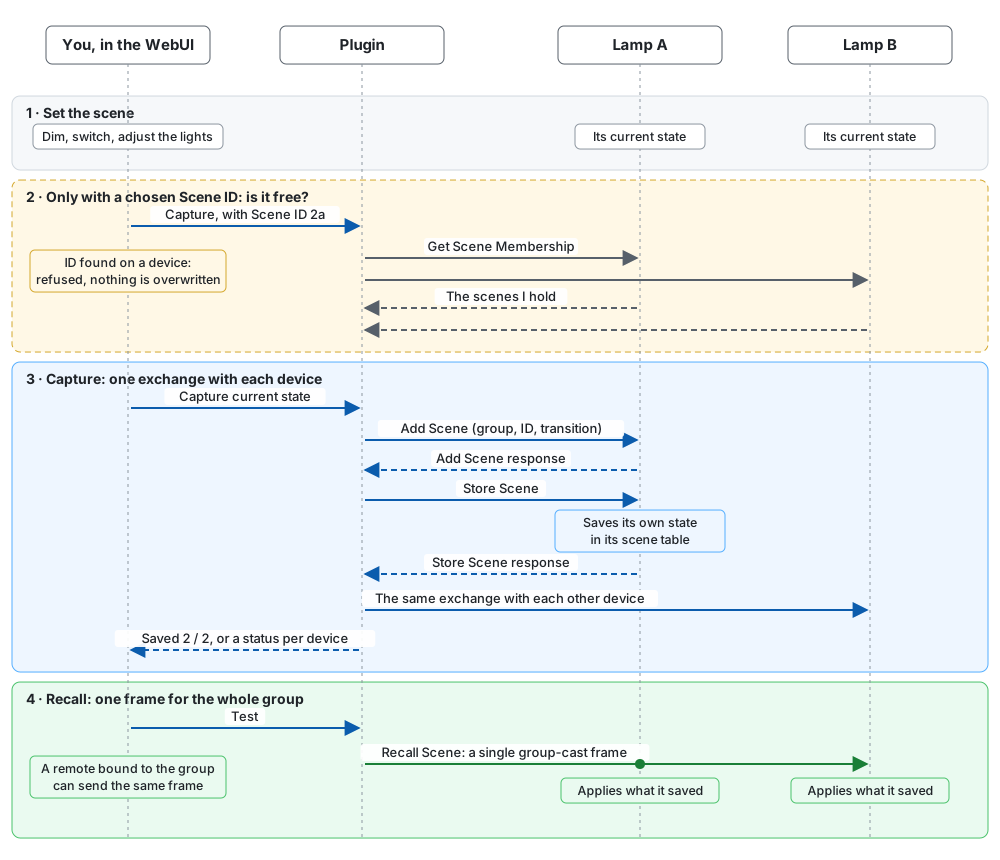
- Set the scene. Use your widgets or switches to put the lights in the state you want. The plugin does not choose the state: it captures what is there.
- Check the ID, only if you chose one. Saving a scene replaces whatever a device already holds under that ID, and the plugin only knows its own scenes. So it first asks each device which scenes it holds, and refuses if the ID is taken (see Choosing the scene ID).
- Capture. The plugin talks to each device separately, not to the group, because only a direct command gets an answer. It sends Add Scene, which creates the entry with the transition time, then Store Scene, which makes the device save its current state. The answer to Store Scene decides: the device is Saved, or the page tells you why not.
- Recall. The plugin sends one Recall Scene to the group. The devices do the rest.
A device of the group without the Scenes cluster, such as some plugs, cannot store anything. The plugin keeps its on/off state and level, or the position of a cover, at the capture and sends them as direct commands at each recall. It shows as Direct control. A device with a Scenes cluster only as an output, such as a remote, is not part of the scene.
Before you start
- Enable group management and create a group with your lights.
- In Settings, Available services, enable Enable native Zigbee scenes (
enableNativeScenes).
- Click Save and restart the plugin.
With its first scene, a group also gets a Selector Switch in Domoticz to recall its scenes.
The coordinator does not have to be a member of the group: Coordinator is a member plays no part in capturing or recalling a scene.
The Groups & Scenes page
Everything happens on Management > Groups & Scenes. The page has the key figures on top, a switch By group / By scene, and below it the list and the detail of what you selected.
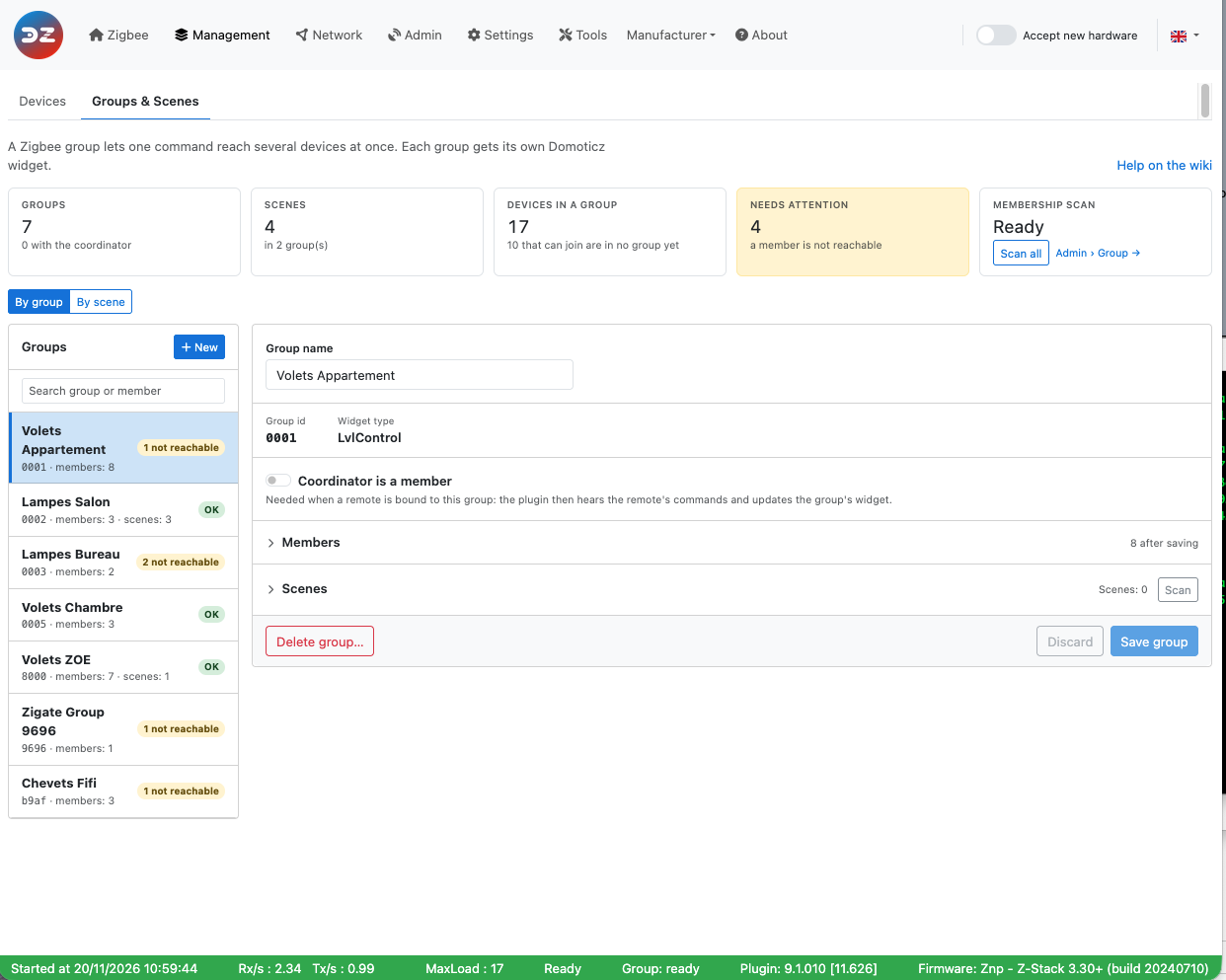
With scenes enabled, the key figures gain Scenes: the number of scenes, the number of groups that have some, and how many need a look, for example a device that did not save the scene. In the list of groups, each group shows its number of scenes.
By group
This is where you create and change scenes. Select a group: its scenes are in the Scenes section, under its members. Both sections fold when you click their title.
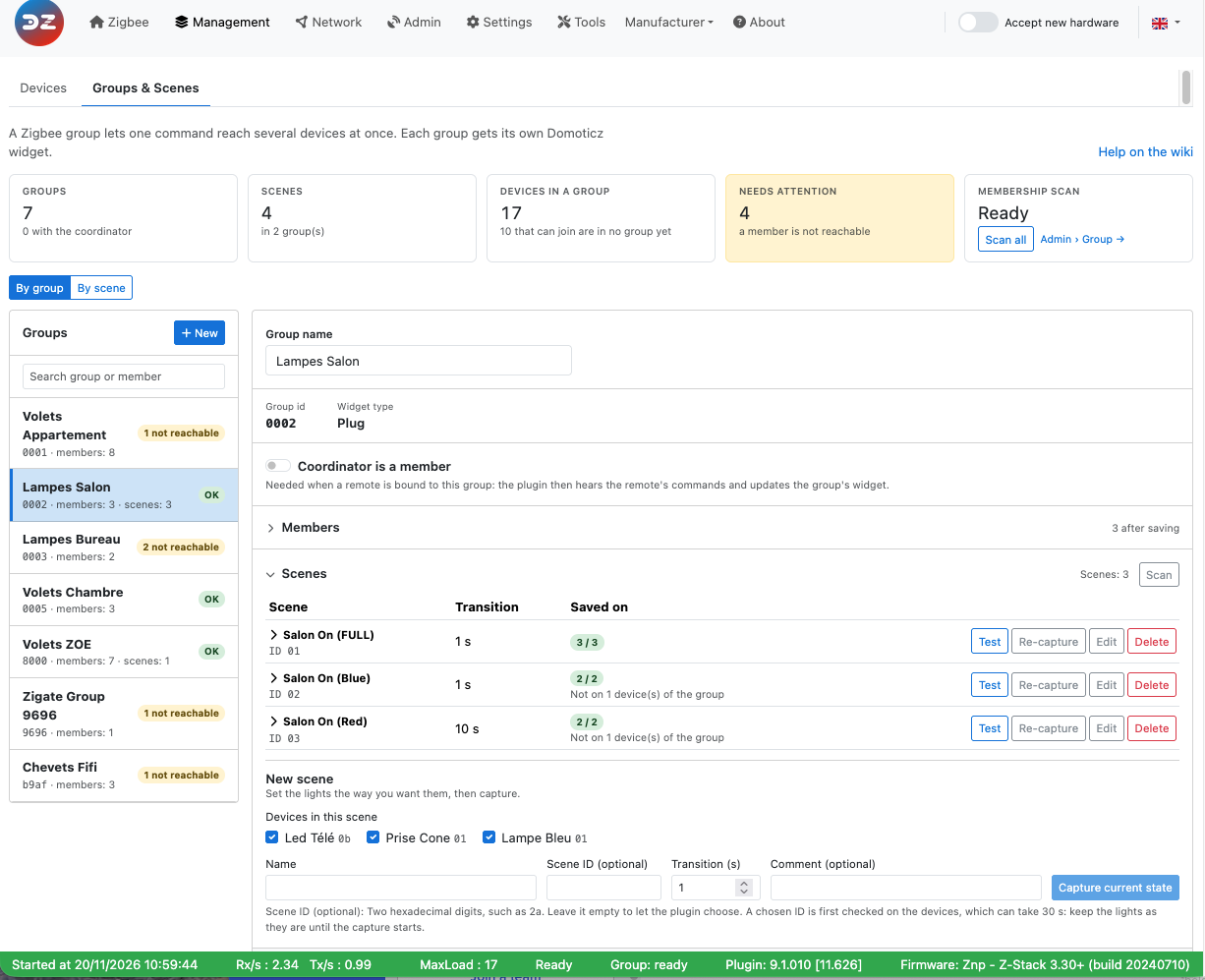
Column
What it shows
Scene
The name, the scene ID in hexadecimal, and the comment if it has one. Click it to see the devices. Found on the devices marks a scene the plugin did not create (see Scan).
Transition
The time the devices take to reach the state of the scene when it is recalled, in seconds (see The transition time). Unknown on a scene found by a scan.
Saved on
How many devices with the Scenes cluster hold the scene: 3 / 3. Green when all do, orange when one is missing, grey during a capture. Direct control devices are not counted. Not on n device(s) of the group means the others are outside this scene, which is normal.
Button
What it does
Test
Recalls the scene, for real: the lights change.
Re-capture
Replaces the scene with the current state of the ticked devices, and lets you change the transition time. Tick a device to bring it in, such as one that joined the group since. Untick one to take it out.
Retry
Only when a device failed. Captures again on the failed devices only. Each one saves the state it is in now, so put the lights back first.
Edit
Changes the name and the comment in the plugin, and can take devices out of the scene. Only a device taken out is sent anything.
Delete
Removes the scene from the devices of the group and from the plugin, after a confirmation.
The transition time can only change with Re-capture: on a device, it is saved with the scene.
The devices of a scene
Click a scene to open it. The first line gives its dates: when it was created (or found), its last change, and when it was last recalled from the WebUI.
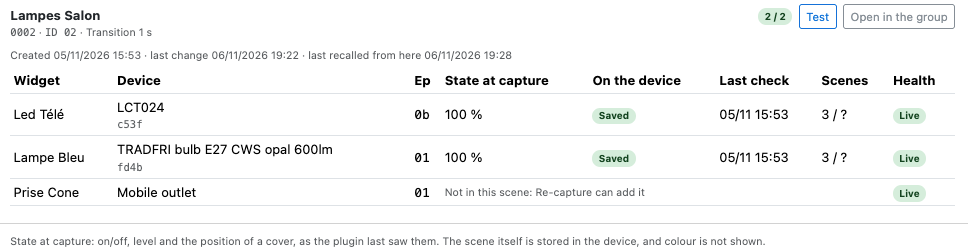
Column
What it shows
Widget, Device, Ep
The Domoticz widget, the model and short address of the device, its endpoint.
State at capture
On/off and level, or Position 60 % · tilt 15 % on a cover, as the plugin last saw them at the capture. It is a reminder, not what the device holds: nothing reads it back, and colour is not shown. Unknown means the plugin had no value. That is normal on a scene found by a scan. The scene itself is fine.
On the device
Saved, Waiting… during a capture, or what went wrong (see Troubleshooting). Direct control for a device without the Scenes cluster.
Last check
When the device last confirmed this scene: at the capture, or at a scan.
Scenes
The scenes on the device against what it can hold, such as 3 / 16. It counts all the groups of the device, which share one table. The total comes from a scan. ? means no scan yet, or a device that cannot tell how much room it has left. Empty for a Direct control device.
Health
The state of the device, as on the device list.
Create a scene
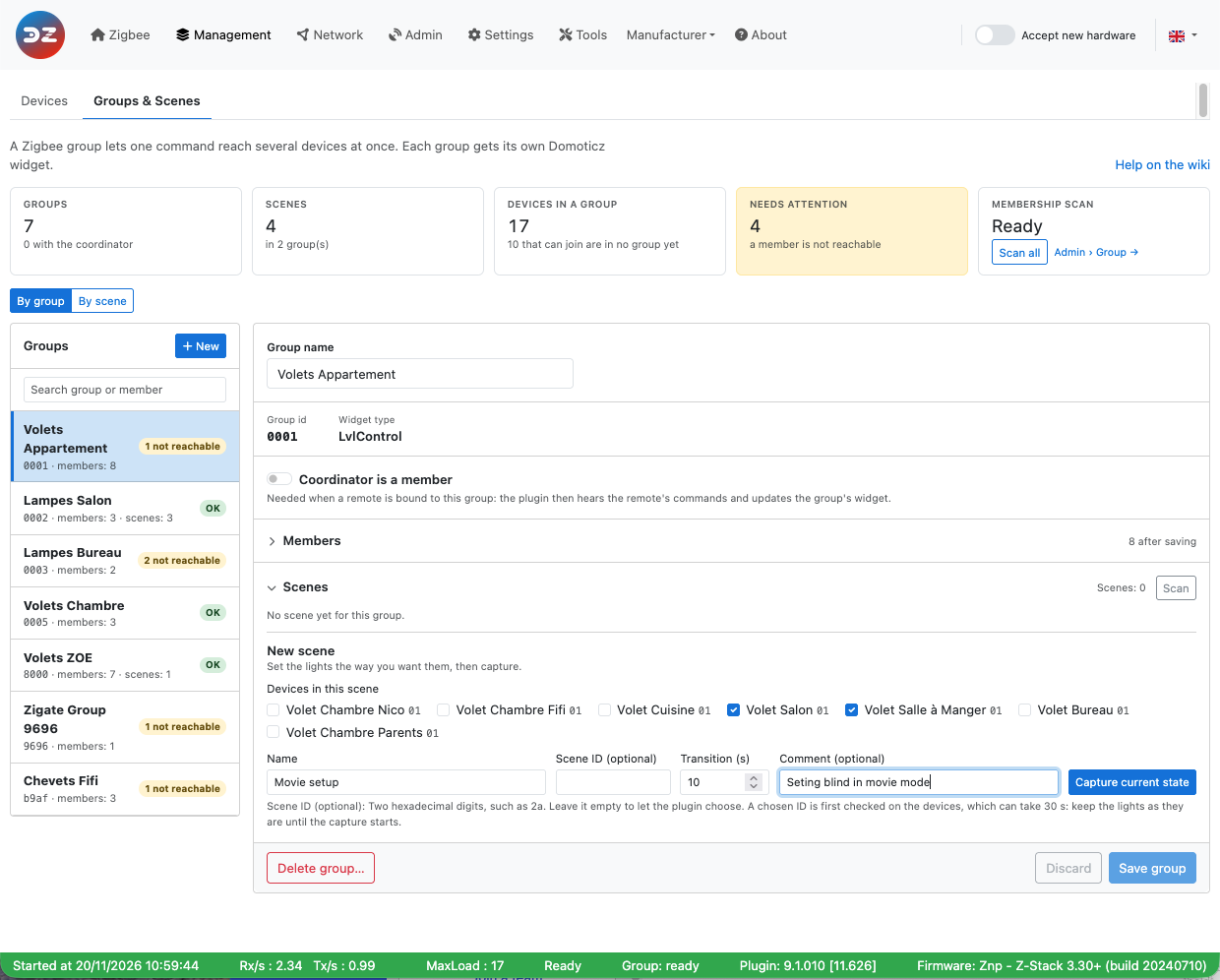
- Set the lights the way you want them.
- Select the group and go to New scene.
- Under Devices in this scene, untick the devices that must stay out of it, if any.
- Give it a Name: up to 32 characters, without
|, and unique in the group.
- Set the Transition, in whole seconds (see The transition time).
- Click Capture current state. The scene appears with Waiting… on its devices, then Saved.
Leave Scene ID empty unless you need a particular one: the plugin takes the lowest free ID.
Comment is optional: up to 200 characters to say what the scene is for. You can change it later with Edit. Like the name, it is only kept by the plugin: a device stores neither. If the scenes file of the plugin is lost, a scan finds the scenes again, without their names and comments.
A scene on part of a group
A scene does not have to be on every device of its group. The recall still goes to the whole group, in one frame, and a device without the scene ignores it: it stays as it is. So a Reading scene can light two lamps of the living room and leave the third alone.
The device boxes only show with two devices or more. A scene needs at least one device with the Scenes cluster.
- At the capture, untick the devices to leave out. They save nothing.
- To take a device out later, untick it in Edit and save. It is told to forget this scene and stays in the group. Its other scenes do not change, nor do the other devices.
- To bring a device in, or one that joined the group since, tick it in Re-capture. This saves the current state of all the ticked devices: set the lights first.
- Re-capture stays on the devices of the scene: a device taken out does not come back unless you tick it.
Three things to know:
- A device that did not hear the order, because it was off, still holds the scene and still answers a recall. The plugin does not wait for the answer. The next scan shows it in the scene again: take it out once more, with the device on.
- A scene ID you choose is checked on the whole group, including the devices left out: a device holding that ID would answer the recall.
- The Off level of the Selector switches off the whole group, not only the devices of the scene.
Scenes with covers
Shutters, blinds and curtains (cluster 0102) can be in a scene, alone or with lights.
- A cover with the Scenes cluster stores its position itself, like a lamp stores its level. Most covers do.
- A cover without it shows as Direct control: the plugin keeps its lift and tilt at the capture and sends them at each recall.
Let a cover stop before you capture. It saves where it is at that moment, so a shutter still moving saves a position halfway.
The position is the one the device reports, shown as it is in State at capture. On a cover set as inverted in Domoticz, it can read the other way round from its widget. A recall is not affected.
The transition time does not apply. A cover moves at its own speed.
The Selector waits longer. After a recall it leaves a scene with a cover alone for 2 minutes, for the cover to arrive, instead of 10 seconds. After that it goes to Off if a cover moves by more than 2 %. A cover moved during those 2 minutes is not noticed.
A battery cover may not follow a recall (see Limits today). Test it with Test before you rely on it.
The transition time
Transition is the time a device takes to go from the state it is in to the state of the scene, when the scene is recalled. It is a fade, and it has nothing to do with the capture: capturing a scene changes nothing on the lights, whatever the transition.
For example, a scene saved with a lamp at 100 % and a transition of 5:
- the lamp is at 20 %: on a recall it rises to 100 % over 5 seconds;
- the lamp is off: it comes on and rises to 100 % over 5 seconds;
- the lamp is already at 100 %: nothing shows.
Transition
What happens at a recall
0The device goes to the state as fast as it can.
1One second. This is the default.
Up to 65534
About 18 hours. Whole seconds only.
What to know about it:
- The device keeps it, with the scene. A recall carries no time, so the transition is the same from the WebUI and from a Zigbee remote.
- To change it, re-capture. There is no other way, and Re-capture also saves the state the lights are in now: put them back first.
- The device does the fade. It only applies to what can change gradually. A plug or a relay goes straight to on or off. If a device jumps instead of fading, its firmware ignores the transition: the plugin cannot change that, and it does not know it either. Try it with Test.
- A Direct control device has no scene to hold it. At a recall the plugin sends it the level with the same time. On or off without a level goes at once.
- On a scene found by a scan it shows Unknown: the device holds one, but a scan cannot read it. Test shows it in practice. Re-capture sets it, starting from
1, and so does Retry on a failed device.
It is not the same thing as the Command transitions for Lights in Groups of the Settings. Those are in tenths of a second, for the commands of the group widget. They play no part in a scene.
Choosing the scene ID
You may need a given ID, typically for a remote that recalls a fixed scene. Enter it in Scene ID as two hexadecimal digits, such as 2a. Be careful with remotes that document a decimal number: scene 42 is 2a.
Such a remote usually has a fixed group too, and the scene must be in that group: a scene is identified by both. In that case, create the group with the Group id it uses.
Since saving under an ID replaces what a device holds, the plugin first scans the group:
- Checking that ID 2a is free on the devices… shows during the scan. It can last 30 seconds if a device does not answer. Leave the lights as they are: they are captured when the scan ends, not when you clicked.
- If the ID is free, the capture starts on its own.
- If a device holds the ID, nothing is overwritten and a message tells you. The scene it holds now shows in the list as Found on the devices. If it is the one you want to replace, use its Re-capture.
A device that does not answer the scan cannot be checked, and it is captured like the others.
Find the scenes already on the devices
A remote or another controller may have set scenes on your devices. The Scan button of the Scenes section asks each device of the group which scenes it holds.
A scene the plugin does not know appears as Scene 07, marked Found on the devices, with an Unknown transition. You can test it, rename it or delete it. A scan can only learn the ID, not what the scene contains: to see it, test it. Re-capture makes it a normal scene.
A scan also checks the scenes the plugin knows: a device that no longer holds one shows No longer on this device.
The line under the title gives the result of the last scan, and which devices did not answer.
By scene
By scene turns the page around: Scene, then Group, then Device. It is the place to see everything at a glance.
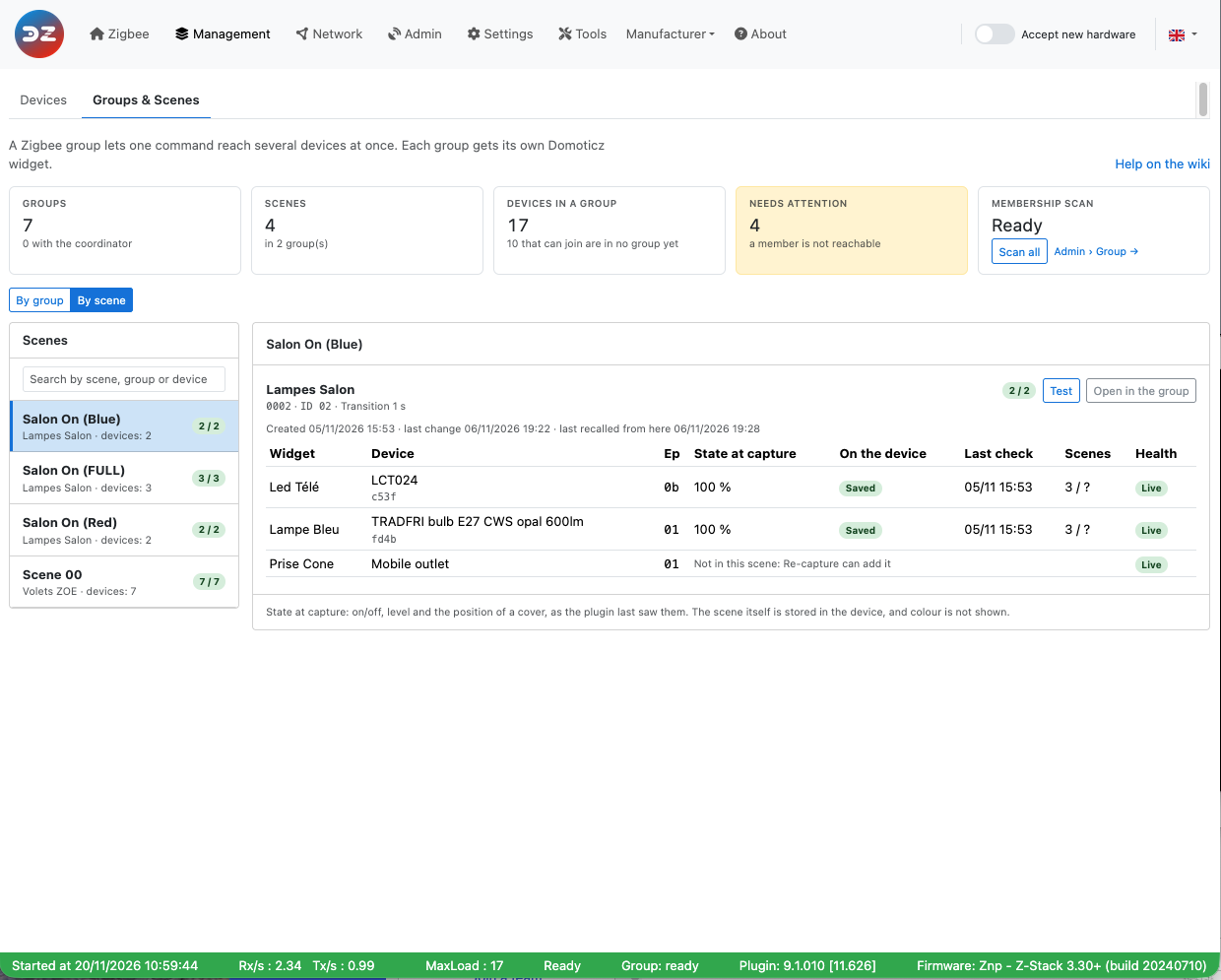
The list on the left has every scene, with its groups, its number of devices and how many saved it. Search by scene, group or device.
Scenes with the same name are shown as one, with their groups below it. A Cinema scene on two groups is really two scenes, but this is how you think of it. In that case Test in the n groups recalls them all, one frame per group.
Each group has its Test button and Open in the group, which takes you to that scene in By group: re-capture, rename and delete are done there, as they apply to one group.
Recall a scene from Domoticz
Each group with at least one scene has a Selector Switch in Domoticz, next to the widget of the group, named after the plugin hardware and the group: Zigbee - Lampes Salon - Scenes for a group Lampes Salon on a hardware Zigbee. The plugin creates it with the first scene of the group. It has one level per scene, under the name of the scene, plus Off.
- Click a scene and the plugin recalls it: one frame to the group, as with Test. Clicking the same scene again recalls it again, for example after a lamp was moved by hand. The levels show as buttons for that reason.
- Off switches off the whole group, as the widget of the group does, not only the devices of the scene.
- It shows the scene in force. A recall from the WebUI moves it to that scene too. Once the devices have settled, if one of them leaves the scene (switched off or on, or its level changed by hand), the Selector goes back to Off. It moves with its triggers, so events and scripts see it.
- It is an ordinary Selector Switch. Put it on the dashboard or a room plan, use it in a timer, in a Domoticz scene or group, in Blockly or dzVents. Its Selector Actions and the other options you set are kept.
Levels, for scripts and events
A Domoticz Selector stores a level, not a name: the first scene is level 10, the second 20, and so on. Off is 0.
- A scene keeps its level for life. Renaming it only changes the name of the level. Deleting it leaves its level shown as
-, which does nothing, so the following scenes keep theirs. A new scene takes the lowest free level.
- So a script or a timer that uses a level keeps working when you rename, add or delete other scenes.
For example, in dzVents, to recall the scene at level 20:
domoticz.devices('Zigbee - Lampes Salon - Scenes').switchSelector(20)
Use the name of your own Selector, as shown in Setup > Devices.
When the Selector goes back to Off
After a recall the plugin waits for the devices to arrive: the transition time of the scene plus 10 seconds, or 2 minutes when the scene holds a cover (see Scenes with covers). From then on, the Selector goes to Off as soon as a device of the scene:
- switches on or off;
- changes its level by more than 5 steps out of 254 (about 2 %), or a cover moves by more than 2 %.
A device of the group outside the scene does not count. A colour change is not seen. Going to Off this way only shows it: nothing is sent to the devices, and the Off action of the Selector runs like any other level change.
Deleting the Selector
- When the last scene of a group is deleted, the plugin removes the Selector. If you had deleted the widget of the group before, the group goes with it.
- If you delete the Selector yourself in Domoticz, the scenes stay on the devices and in the WebUI. The Selector comes back with the next new scene of the group, the next scan, or the next start of the plugin.
Limits today
- The plugin does not follow a recall sent by a remote. Neither Last recalled nor the Selector change: they only follow a recall from Domoticz, the WebUI or the REST API.
- Colour is saved by the devices that support it, but not shown in State at capture. A Direct control device gets on/off and level, or the position of a cover, and no colour.
- Thermostats cannot be in a scene: most are not offered for groups, and a scene belongs to a group.
- Battery devices do not follow group commands (see Zigbee groups), so they do not follow a scene either.
- Group
0000 cannot hold scenes.
- The table of a device is limited, and the limit depends on the device. It is shared by all its groups.
- A device that leaves a group through the plugin loses the scenes of that group. A scene with no device left disappears, so deleting a group deletes its scenes.
Troubleshooting
What you see
What it means
What to do
Restart the plugin to use scenes.
The setting is on, the plugin was not restarted.
Restart the plugin.
No Scenes section
The setting is off, or the group is new and not saved yet.
See Before you start.
None of the devices in … supports Zigbee scenes.
No device of the group has the Scenes cluster.
The devices can still be used in a group.
No answer
The device did not answer within 30 seconds.
Check that it is powered and reachable, set it in the right state, then Retry.
Scene table full
The device has no room left.
Delete scenes on this device, in any of its groups.
Refused: status xx
The device refused, with this ZCL status.
Note the status and turn on the Scene debug.
Interrupted by a restart
The plugin restarted during a capture.
Retry.
No longer on this device
A scan did not find the scene on the device: it was reset, or the scene was removed by something else.
Retry or Re-capture.
Not on n device(s) of the group
Not an error: these devices are outside this scene.
To bring one in, tick it in Re-capture.
The coordinator is busy.
The plugin has too many commands waiting.
Try again in a moment.
A scene does not do what you saved
The device stored something else, or was not in the state you thought.
Test it, then Re-capture with the lights set.
For the curious
- Debug. Turn on the Scene category in Tools > Debug to see each step in the plugin log.
-
REST. A scene can be recalled from a script, with the port of the plugin:
curl -X PUT http://<server>:9440/rest-z4d/1/scenes/0001/01/recall
Here 0001 is the group and 01 the scene. The change is a PUT, like the other changes of the plugin.
-
Where the plugin keeps them. Names, transition times and statuses are in Z4D_Scenes-<HardwareID>.json, in the plugin data folder, and in the Domoticz hardware record. To read that record:
python3 Tools/query_domoticz_hardware_configuration_record.py \
  --db domoticz.db \
  --id <HardwareID> \
  --decode-b64 \
  --entry PluginStore-Z4D_Scenes.Records
Zigbee scenes
This page explains what a Zigbee scene is, how it differs from a Domoticz scene, how the plugin records one, and how to use the WebUI to manage them.
Plugin 9.1.010 and later, zigpy radios only. Native scenes are not available on ZiGate.
What a Zigbee scene is
A Zigbee scene is a state that the devices remember themselves. You set your lights the way you want them, you ask each device to save that state under a number, and from then on one short command tells them all: “go back to number 3”.
- A scene lives in the devices, not in the plugin and not in Domoticz. Each device keeps its own scene table, with what it has to do: its on/off state, its level, its colour if it has one, the position of a cover.
- A scene belongs to one group. On a device, a scene is identified by its group and its scene ID, from
00toff. Scene01of group0001and scene01of group0002are two different scenes. So you need a Zigbee group first. It can be on all the devices of the group or on some of them. - The name is only known to the plugin. The devices only know the ID.
- Recalling a scene takes a single frame, sent to the group. Each device of the group receives it, looks in its own table, and applies what it saved.
Zigbee scenes or Domoticz scenes?
Domoticz has its own scenes (Setup > More Options > Scenes/Groups). They are a different thing: a list of commands that Domoticz sends one after the other.
| Zigbee scene | Domoticz scene | |
|---|---|---|
| Where it is stored | In each device | In Domoticz |
| What is sent | One frame to the group | One command per device |
| Timing | All the devices start together | One after the other: on a large scene you can see the lights change in turn |
| Network load | One frame, whatever the size of the group | Grows with the number of devices |
| Fading | Done by the devices, from the transition time of the scene | Depends on what each command allows |
| Without Domoticz | A Zigbee remote that recalls the scene keeps working | Nothing happens |
| Devices | Zigbee only, in the same group | Anything Domoticz controls: Zigbee, Wi-Fi, 433 MHz… |
| Triggers | The Selector Switch of the group (dashboard, timers, events, dzVents, Domoticz scenes), the WebUI, or a Zigbee remote | Timers, events, dzVents, the Domoticz dashboard |
| Capacity | Limited by the table of each device | No real limit |
Choose a Zigbee scene when several Zigbee lights must change together, without a visible delay, or when a remote must keep working if Domoticz is down.
Stay on a Domoticz scene when you mix technologies. You can also combine both: a Domoticz scene, timer or script can recall a Zigbee scene through the Selector Switch of its group.
How a scene is recorded and recalled
- Set the scene. Use your widgets or switches to put the lights in the state you want. The plugin does not choose the state: it captures what is there.
- Check the ID, only if you chose one. Saving a scene replaces whatever a device already holds under that ID, and the plugin only knows its own scenes. So it first asks each device which scenes it holds, and refuses if the ID is taken (see Choosing the scene ID).
- Capture. The plugin talks to each device separately, not to the group, because only a direct command gets an answer. It sends Add Scene, which creates the entry with the transition time, then Store Scene, which makes the device save its current state. The answer to Store Scene decides: the device is Saved, or the page tells you why not.
- Recall. The plugin sends one Recall Scene to the group. The devices do the rest.
A device of the group without the Scenes cluster, such as some plugs, cannot store anything. The plugin keeps its on/off state and level, or the position of a cover, at the capture and sends them as direct commands at each recall. It shows as Direct control. A device with a Scenes cluster only as an output, such as a remote, is not part of the scene.
Before you start
- Enable group management and create a group with your lights.
- In Settings, Available services, enable Enable native Zigbee scenes (
enableNativeScenes). - Click Save and restart the plugin.
With its first scene, a group also gets a Selector Switch in Domoticz to recall its scenes.
The coordinator does not have to be a member of the group: Coordinator is a member plays no part in capturing or recalling a scene.
The Groups & Scenes page
Everything happens on Management > Groups & Scenes. The page has the key figures on top, a switch By group / By scene, and below it the list and the detail of what you selected.
With scenes enabled, the key figures gain Scenes: the number of scenes, the number of groups that have some, and how many need a look, for example a device that did not save the scene. In the list of groups, each group shows its number of scenes.
By group
This is where you create and change scenes. Select a group: its scenes are in the Scenes section, under its members. Both sections fold when you click their title.
| Column | What it shows |
|---|---|
| Scene | The name, the scene ID in hexadecimal, and the comment if it has one. Click it to see the devices. Found on the devices marks a scene the plugin did not create (see Scan). |
| Transition | The time the devices take to reach the state of the scene when it is recalled, in seconds (see The transition time). Unknown on a scene found by a scan. |
| Saved on | How many devices with the Scenes cluster hold the scene: 3 / 3. Green when all do, orange when one is missing, grey during a capture. Direct control devices are not counted. Not on n device(s) of the group means the others are outside this scene, which is normal. |
| Button | What it does |
|---|---|
| Test | Recalls the scene, for real: the lights change. |
| Re-capture | Replaces the scene with the current state of the ticked devices, and lets you change the transition time. Tick a device to bring it in, such as one that joined the group since. Untick one to take it out. |
| Retry | Only when a device failed. Captures again on the failed devices only. Each one saves the state it is in now, so put the lights back first. |
| Edit | Changes the name and the comment in the plugin, and can take devices out of the scene. Only a device taken out is sent anything. |
| Delete | Removes the scene from the devices of the group and from the plugin, after a confirmation. |
The transition time can only change with Re-capture: on a device, it is saved with the scene.
The devices of a scene
Click a scene to open it. The first line gives its dates: when it was created (or found), its last change, and when it was last recalled from the WebUI.
| Column | What it shows |
|---|---|
| Widget, Device, Ep | The Domoticz widget, the model and short address of the device, its endpoint. |
| State at capture | On/off and level, or Position 60 % · tilt 15 % on a cover, as the plugin last saw them at the capture. It is a reminder, not what the device holds: nothing reads it back, and colour is not shown. Unknown means the plugin had no value. That is normal on a scene found by a scan. The scene itself is fine. |
| On the device | Saved, Waiting… during a capture, or what went wrong (see Troubleshooting). Direct control for a device without the Scenes cluster. |
| Last check | When the device last confirmed this scene: at the capture, or at a scan. |
| Scenes | The scenes on the device against what it can hold, such as 3 / 16. It counts all the groups of the device, which share one table. The total comes from a scan. ? means no scan yet, or a device that cannot tell how much room it has left. Empty for a Direct control device. |
| Health | The state of the device, as on the device list. |
Create a scene
- Set the lights the way you want them.
- Select the group and go to New scene.
- Under Devices in this scene, untick the devices that must stay out of it, if any.
- Give it a Name: up to 32 characters, without
|, and unique in the group. - Set the Transition, in whole seconds (see The transition time).
- Click Capture current state. The scene appears with Waiting… on its devices, then Saved.
Leave Scene ID empty unless you need a particular one: the plugin takes the lowest free ID.
Comment is optional: up to 200 characters to say what the scene is for. You can change it later with Edit. Like the name, it is only kept by the plugin: a device stores neither. If the scenes file of the plugin is lost, a scan finds the scenes again, without their names and comments.
A scene on part of a group
A scene does not have to be on every device of its group. The recall still goes to the whole group, in one frame, and a device without the scene ignores it: it stays as it is. So a Reading scene can light two lamps of the living room and leave the third alone.
The device boxes only show with two devices or more. A scene needs at least one device with the Scenes cluster.
- At the capture, untick the devices to leave out. They save nothing.
- To take a device out later, untick it in Edit and save. It is told to forget this scene and stays in the group. Its other scenes do not change, nor do the other devices.
- To bring a device in, or one that joined the group since, tick it in Re-capture. This saves the current state of all the ticked devices: set the lights first.
- Re-capture stays on the devices of the scene: a device taken out does not come back unless you tick it.
Three things to know:
- A device that did not hear the order, because it was off, still holds the scene and still answers a recall. The plugin does not wait for the answer. The next scan shows it in the scene again: take it out once more, with the device on.
- A scene ID you choose is checked on the whole group, including the devices left out: a device holding that ID would answer the recall.
- The Off level of the Selector switches off the whole group, not only the devices of the scene.
Scenes with covers
Shutters, blinds and curtains (cluster 0102) can be in a scene, alone or with lights.
- A cover with the Scenes cluster stores its position itself, like a lamp stores its level. Most covers do.
- A cover without it shows as Direct control: the plugin keeps its lift and tilt at the capture and sends them at each recall.
Let a cover stop before you capture. It saves where it is at that moment, so a shutter still moving saves a position halfway.
The position is the one the device reports, shown as it is in State at capture. On a cover set as inverted in Domoticz, it can read the other way round from its widget. A recall is not affected.
The transition time does not apply. A cover moves at its own speed.
The Selector waits longer. After a recall it leaves a scene with a cover alone for 2 minutes, for the cover to arrive, instead of 10 seconds. After that it goes to Off if a cover moves by more than 2 %. A cover moved during those 2 minutes is not noticed.
A battery cover may not follow a recall (see Limits today). Test it with Test before you rely on it.
The transition time
Transition is the time a device takes to go from the state it is in to the state of the scene, when the scene is recalled. It is a fade, and it has nothing to do with the capture: capturing a scene changes nothing on the lights, whatever the transition.
For example, a scene saved with a lamp at 100 % and a transition of 5:
- the lamp is at 20 %: on a recall it rises to 100 % over 5 seconds;
- the lamp is off: it comes on and rises to 100 % over 5 seconds;
- the lamp is already at 100 %: nothing shows.
| Transition | What happens at a recall |
|---|---|
0 |
The device goes to the state as fast as it can. |
1 |
One second. This is the default. |
Up to 65534 |
About 18 hours. Whole seconds only. |
What to know about it:
- The device keeps it, with the scene. A recall carries no time, so the transition is the same from the WebUI and from a Zigbee remote.
- To change it, re-capture. There is no other way, and Re-capture also saves the state the lights are in now: put them back first.
- The device does the fade. It only applies to what can change gradually. A plug or a relay goes straight to on or off. If a device jumps instead of fading, its firmware ignores the transition: the plugin cannot change that, and it does not know it either. Try it with Test.
- A Direct control device has no scene to hold it. At a recall the plugin sends it the level with the same time. On or off without a level goes at once.
- On a scene found by a scan it shows Unknown: the device holds one, but a scan cannot read it. Test shows it in practice. Re-capture sets it, starting from
1, and so does Retry on a failed device.
It is not the same thing as the Command transitions for Lights in Groups of the Settings. Those are in tenths of a second, for the commands of the group widget. They play no part in a scene.
Choosing the scene ID
You may need a given ID, typically for a remote that recalls a fixed scene. Enter it in Scene ID as two hexadecimal digits, such as 2a. Be careful with remotes that document a decimal number: scene 42 is 2a.
Such a remote usually has a fixed group too, and the scene must be in that group: a scene is identified by both. In that case, create the group with the Group id it uses.
Since saving under an ID replaces what a device holds, the plugin first scans the group:
- Checking that ID 2a is free on the devices… shows during the scan. It can last 30 seconds if a device does not answer. Leave the lights as they are: they are captured when the scan ends, not when you clicked.
- If the ID is free, the capture starts on its own.
- If a device holds the ID, nothing is overwritten and a message tells you. The scene it holds now shows in the list as Found on the devices. If it is the one you want to replace, use its Re-capture.
A device that does not answer the scan cannot be checked, and it is captured like the others.
Find the scenes already on the devices
A remote or another controller may have set scenes on your devices. The Scan button of the Scenes section asks each device of the group which scenes it holds.
A scene the plugin does not know appears as Scene 07, marked Found on the devices, with an Unknown transition. You can test it, rename it or delete it. A scan can only learn the ID, not what the scene contains: to see it, test it. Re-capture makes it a normal scene.
A scan also checks the scenes the plugin knows: a device that no longer holds one shows No longer on this device.
The line under the title gives the result of the last scan, and which devices did not answer.
By scene
By scene turns the page around: Scene, then Group, then Device. It is the place to see everything at a glance.
The list on the left has every scene, with its groups, its number of devices and how many saved it. Search by scene, group or device.
Scenes with the same name are shown as one, with their groups below it. A Cinema scene on two groups is really two scenes, but this is how you think of it. In that case Test in the n groups recalls them all, one frame per group.
Each group has its Test button and Open in the group, which takes you to that scene in By group: re-capture, rename and delete are done there, as they apply to one group.
Recall a scene from Domoticz
Each group with at least one scene has a Selector Switch in Domoticz, next to the widget of the group, named after the plugin hardware and the group: Zigbee - Lampes Salon - Scenes for a group Lampes Salon on a hardware Zigbee. The plugin creates it with the first scene of the group. It has one level per scene, under the name of the scene, plus Off.
- Click a scene and the plugin recalls it: one frame to the group, as with Test. Clicking the same scene again recalls it again, for example after a lamp was moved by hand. The levels show as buttons for that reason.
- Off switches off the whole group, as the widget of the group does, not only the devices of the scene.
- It shows the scene in force. A recall from the WebUI moves it to that scene too. Once the devices have settled, if one of them leaves the scene (switched off or on, or its level changed by hand), the Selector goes back to Off. It moves with its triggers, so events and scripts see it.
- It is an ordinary Selector Switch. Put it on the dashboard or a room plan, use it in a timer, in a Domoticz scene or group, in Blockly or dzVents. Its Selector Actions and the other options you set are kept.
Levels, for scripts and events
A Domoticz Selector stores a level, not a name: the first scene is level 10, the second 20, and so on. Off is 0.
- A scene keeps its level for life. Renaming it only changes the name of the level. Deleting it leaves its level shown as
-, which does nothing, so the following scenes keep theirs. A new scene takes the lowest free level. - So a script or a timer that uses a level keeps working when you rename, add or delete other scenes.
For example, in dzVents, to recall the scene at level 20:
domoticz.devices('Zigbee - Lampes Salon - Scenes').switchSelector(20)
Use the name of your own Selector, as shown in Setup > Devices.
When the Selector goes back to Off
After a recall the plugin waits for the devices to arrive: the transition time of the scene plus 10 seconds, or 2 minutes when the scene holds a cover (see Scenes with covers). From then on, the Selector goes to Off as soon as a device of the scene:
- switches on or off;
- changes its level by more than 5 steps out of 254 (about 2 %), or a cover moves by more than 2 %.
A device of the group outside the scene does not count. A colour change is not seen. Going to Off this way only shows it: nothing is sent to the devices, and the Off action of the Selector runs like any other level change.
Deleting the Selector
- When the last scene of a group is deleted, the plugin removes the Selector. If you had deleted the widget of the group before, the group goes with it.
- If you delete the Selector yourself in Domoticz, the scenes stay on the devices and in the WebUI. The Selector comes back with the next new scene of the group, the next scan, or the next start of the plugin.
Limits today
- The plugin does not follow a recall sent by a remote. Neither Last recalled nor the Selector change: they only follow a recall from Domoticz, the WebUI or the REST API.
- Colour is saved by the devices that support it, but not shown in State at capture. A Direct control device gets on/off and level, or the position of a cover, and no colour.
- Thermostats cannot be in a scene: most are not offered for groups, and a scene belongs to a group.
- Battery devices do not follow group commands (see Zigbee groups), so they do not follow a scene either.
- Group
0000cannot hold scenes. - The table of a device is limited, and the limit depends on the device. It is shared by all its groups.
- A device that leaves a group through the plugin loses the scenes of that group. A scene with no device left disappears, so deleting a group deletes its scenes.
Troubleshooting
| What you see | What it means | What to do |
|---|---|---|
| Restart the plugin to use scenes. | The setting is on, the plugin was not restarted. | Restart the plugin. |
| No Scenes section | The setting is off, or the group is new and not saved yet. | See Before you start. |
| None of the devices in … supports Zigbee scenes. | No device of the group has the Scenes cluster. | The devices can still be used in a group. |
| No answer | The device did not answer within 30 seconds. | Check that it is powered and reachable, set it in the right state, then Retry. |
| Scene table full | The device has no room left. | Delete scenes on this device, in any of its groups. |
| Refused: status xx | The device refused, with this ZCL status. | Note the status and turn on the Scene debug. |
| Interrupted by a restart | The plugin restarted during a capture. | Retry. |
| No longer on this device | A scan did not find the scene on the device: it was reset, or the scene was removed by something else. | Retry or Re-capture. |
| Not on n device(s) of the group | Not an error: these devices are outside this scene. | To bring one in, tick it in Re-capture. |
| The coordinator is busy. | The plugin has too many commands waiting. | Try again in a moment. |
| A scene does not do what you saved | The device stored something else, or was not in the state you thought. | Test it, then Re-capture with the lights set. |
For the curious
- Debug. Turn on the Scene category in Tools > Debug to see each step in the plugin log.
-
REST. A scene can be recalled from a script, with the port of the plugin:
curl -X PUT http://<server>:9440/rest-z4d/1/scenes/0001/01/recallHere
0001is the group and01the scene. The change is aPUT, like the other changes of the plugin. -
Where the plugin keeps them. Names, transition times and statuses are in
Z4D_Scenes-<HardwareID>.json, in the plugin data folder, and in the Domoticz hardware record. To read that record:python3 Tools/query_domoticz_hardware_configuration_record.py \ --db domoticz.db \ --id <HardwareID> \ --decode-b64 \ --entry PluginStore-Z4D_Scenes.Records