 ZigBeeForDomoticZ plugin Wiki
Install the plugin with PyPluginStore
PyPluginStore is a Domoticz plugin that installs, updates and removes other Python plugins from a web page in Domoticz. It also installs the Python modules each plugin lists in its requirements.txt, so you don’t have to run pip yourself.
PyPluginStore is not maintained by the plugin team. For PyPluginStore problems, open an issue on its repository.
This page installs the stable9 branch of the plugin, on Linux or on Docker.
1. How PyPluginStore installs the plugin
- It clones the plugin from GitHub (
stable9 branch) into the plugins folder of Domoticz. The folder is named Zigate, not Domoticz-Zigbee as in the manual installation. Keep this in mind when another wiki page gives a path such as plugins/Domoticz-Zigbee/....
- It installs the Python modules of
requirements.txt, with the versions pinned in constraints.txt, into a folder of its own: .shared_deps, inside the PyPluginStore folder (plugins/PyPluginStore/.shared_deps). Nothing is installed into the Python environment Domoticz runs with.
- It makes that folder visible to every Python plugin by writing one small
.pth file into the site-packages folder of the Python that runs Domoticz. Python reads .pth files only when Domoticz starts, so Domoticz must be restarted once before the plugin can import its modules.
The .shared_deps folder is shared by all the plugins PyPluginStore manages. If two plugins require versions of the same module that can’t be installed together, PyPluginStore refuses the installation and says so, instead of breaking one of them.
2. Prerequisites
- Domoticz and Python as described in the Requirements. The PyPluginStore catalog lists the plugin for Python 3.13 or newer.
- Python plugin support enabled in Domoticz, and
git available to the user running Domoticz (it is in the official Docker image).
- The user running Domoticz can write to the
plugins, www/templates, www/styles and www/images folders of Domoticz.
- Docker only: the Domoticz container has a restart policy (see 5. Docker).
3. Install PyPluginStore
-
Go to the plugins folder of Domoticz (on Docker, the userdata/plugins folder of the host) and clone PyPluginStore:
cd /path/to/domoticz/plugins
git clone https://github.com/adrighem/PyPluginStore.git
- Restart Domoticz.
- In Domoticz, go to Setup → Hardware and add a hardware of type PyPluginStore. Leave Container Restart on Disabled for now (Docker users: see 5. Docker).
- Go to Setup → Users, edit your user and make sure the Custom menu is checked.
- Open Custom → pypluginstore. The store opens and lists the available plugins.
4. Install the plugin
- In Custom → pypluginstore, in the Plugins tab, search for Zigate (description: “Cloud-free Zigbee integration for Domoticz, built on zigpy…”) and install it.
-
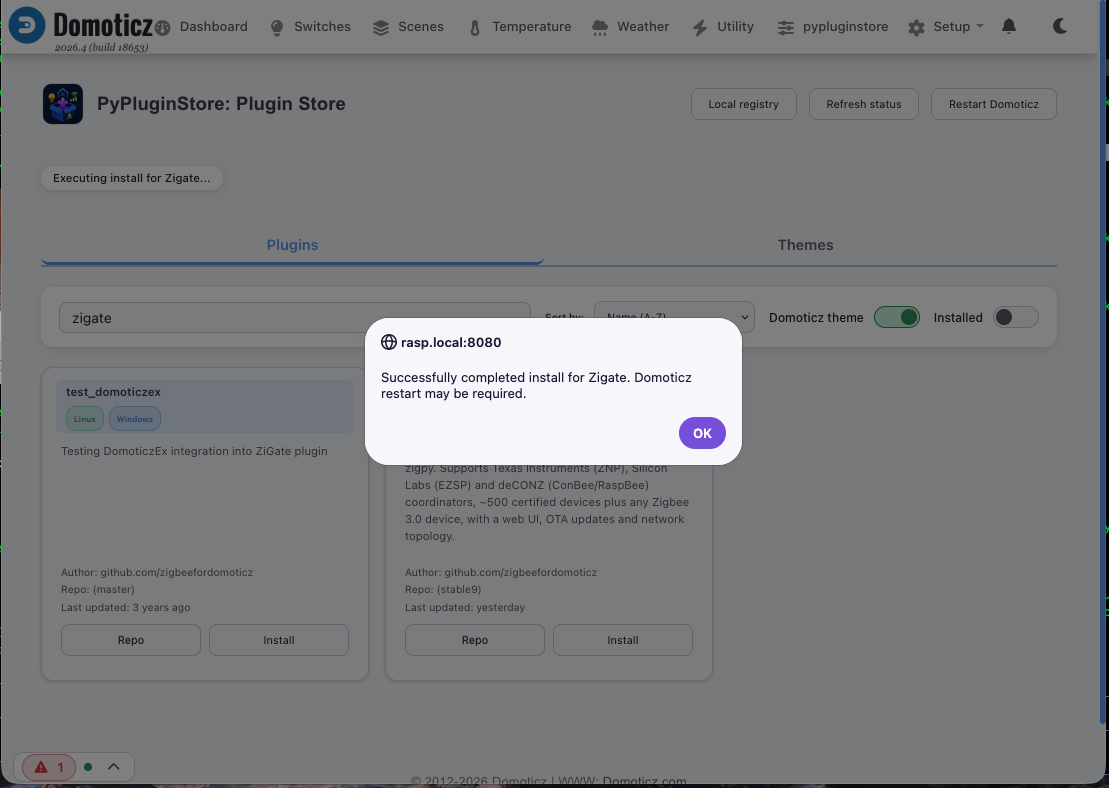
Wait for the installation to finish. The store shows Executing install for Zigate…, then a message: “Successfully completed install for Zigate. Domoticz restart may be required.”
The Domoticz log shows:
Plugin Store: Calling: git clone -b stable9 https://github.com/zigbeefordomoticz/Domoticz-Zigbee.git Zigate
Plugin Store: Plugin Zigate installed successfully.
Plugin Store: ---Restarting Domoticz MAY BE REQUIRED to activate new plugins---
The Python modules are then installed in the background into .shared_deps. This takes a few minutes, especially on a Raspberry Pi.
-
Restart Domoticz. This restart is needed twice over: Domoticz discovers the new plugin only at startup, and the plugin can import its modules only after a restart (see 1. How PyPluginStore installs the plugin).
- On Linux with systemd:
sudo systemctl restart domoticz, or the Restart Domoticz button of PyPluginStore if you allowed it (see the PyPluginStore README).
- On Docker: see 5. Docker.
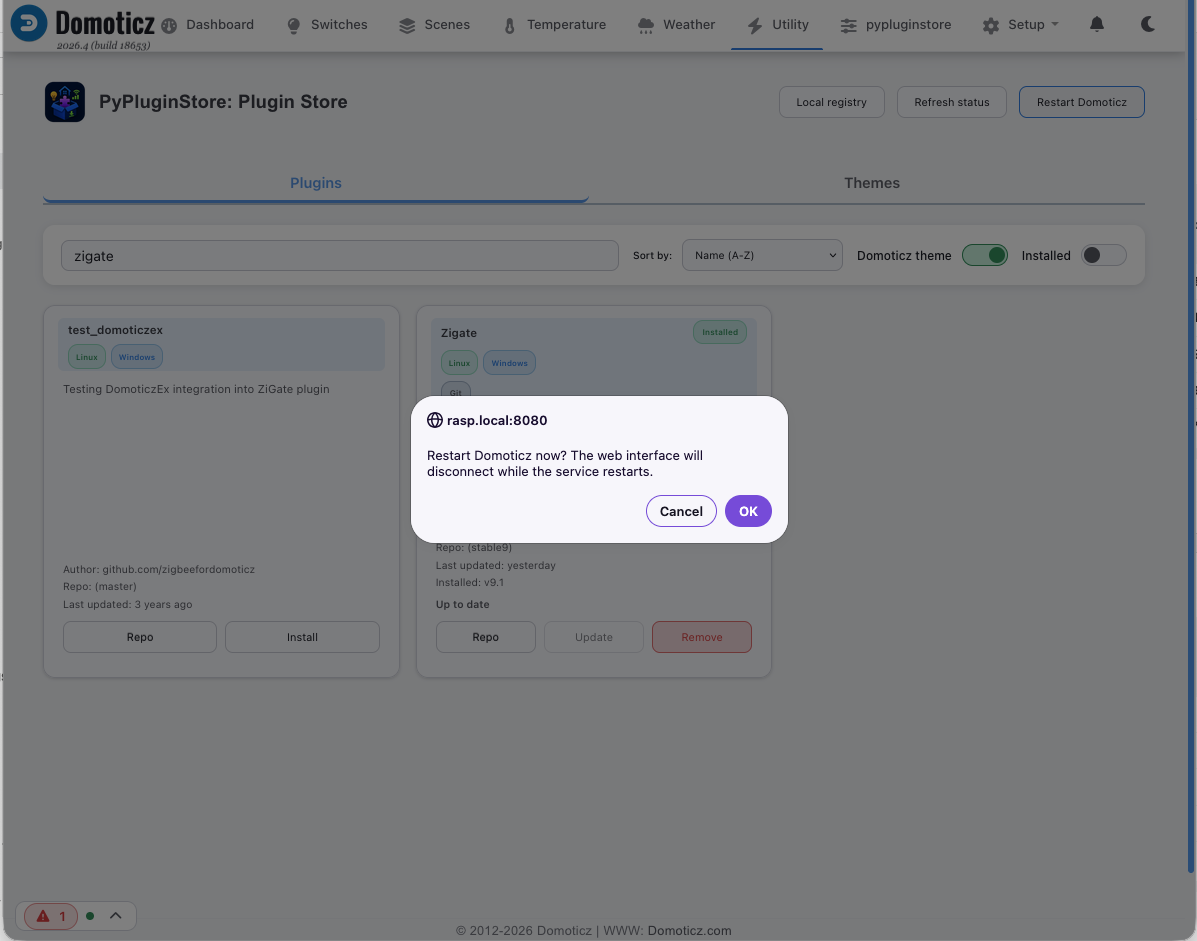
The Restart Domoticz button asks for a confirmation. Once the installation is done, the Zigate card shows Installed, the installed version and Up to date.
As long as the restart is pending, the log shows:
Plugin Store: Restart Domoticz so other plugins can import shared dependencies.
- Move on to step 2 Plugin settings to declare the plugin hardware.
5. Docker
The official domoticz/domoticz image runs Python from a virtual environment, /opt/venv, which is inside the container, not in the userdata volume. That is where PyPluginStore writes its .pth file, for example:
/opt/venv/lib/python3.13/site-packages/pypluginstore-shared-deps-d073ae28ed71.pth
The modules themselves stay in the volume (userdata/plugins/PyPluginStore/.shared_deps), but the .pth file belongs to the container:
Action
.pth fileWhat happens next
docker compose restart, docker restart domoticz, stop/startkept
Nothing to do.
docker compose down then up, --force-recreate, new image, rebuild, Synology “Reset”lost
On the first start, the plugin fails with ModuleNotFoundError (for example No module named 'z4d_certified_devices'). PyPluginStore writes the .pth file again and asks for one more restart.
Let PyPluginStore restart Domoticz by itself
Domoticz has no restart command inside a container: PyPluginStore can only stop Domoticz and rely on the container restart policy to start it again. Without a restart policy, the container stays down.
-
Give the container a restart policy, in docker-compose.yml:
services:
  domoticz:
    restart: unless-stopped
or with docker run, add --restart unless-stopped. Recreate the container once to apply it (docker compose up -d).
-
On the PyPluginStore hardware (Setup → Hardware), set Container Restart to Enabled, then click Update.
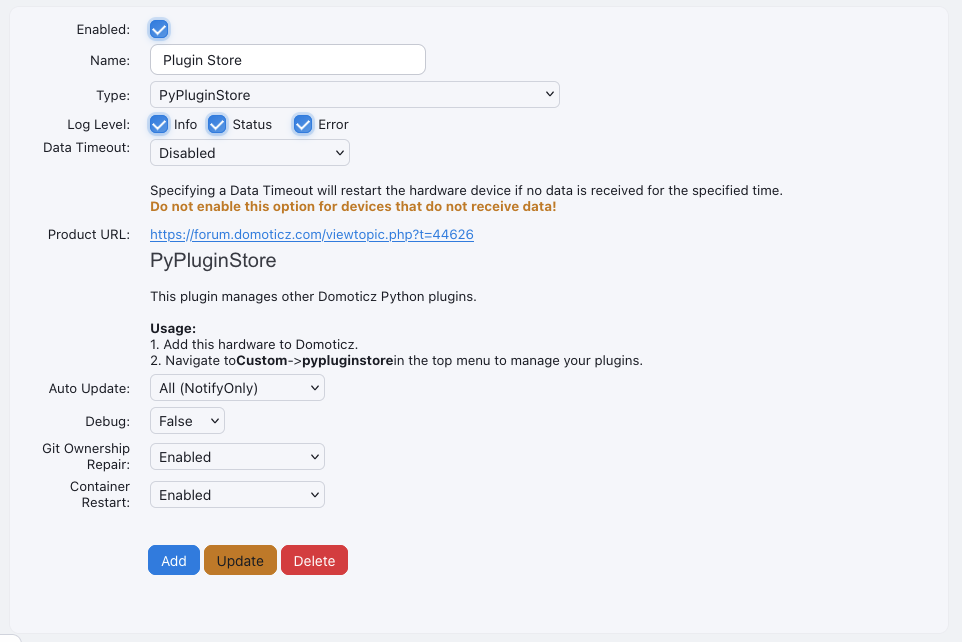
From then on, after an installation or after the container is recreated, PyPluginStore restarts Domoticz once by itself. If it is still disabled, restart the container yourself with docker compose restart (not down/up, which would remove the .pth file again).
Don’t install the modules twice
With PyPluginStore you don’t need the other ways of installing the modules described in Installation on Docker. Use one method only:
- don’t copy
Tools/customstart.sh to the root of userdata. If you already have a userdata/customstart.sh that points to the plugin, remove it;
- don’t build the image from the plugin’s
Docker/dockerfile, which installs the modules into the image.
Otherwise two copies of the modules are installed, possibly in different versions, and it becomes hard to know which one the plugin uses.
6. Check that it works
After the restart, the plugin log shows the module checks, then the coordinator starting, for example:
Status: EZSP: Running Python 3.13
Status: EZSP:    - zigpy 2.4.1 satisfies ==2.4.1
Status: EZSP:    - zigpy_znp 1.1.1 satisfies ==1.1.1
Status: EZSP:    - zigpy_deconz 1.1.1 satisfies ==1.1.1
Status: EZSP: Z4D starts transport Mode: 'ZigpyEZSP' Serial: '/dev/ttyUSB-SonOff-E' ...
Status: EZSP: ++ Started radio ezsp port: /dev/ttyUSB-SonOff-E ...
and PyPluginStore no longer logs Restart Domoticz so other plugins can import shared dependencies.
7. Updates
PyPluginStore checks the installed plugins for updates. Its Auto Update setting chooses what it does:
- All (NotifyOnly) (default): it tells you an update is available; you install it from Custom → pypluginstore.
- All: it installs updates by itself.
- None: no checks.
When an update changes requirements.txt, PyPluginStore installs the new modules too. Restart Domoticz after an update, as for any plugin update.
8. Troubleshooting
Problem
What to do
ModuleNotFoundError in the plugin log just after the installationDomoticz has not been restarted since the modules were installed. Restart it. On Docker, use restart, not down/up.
ModuleNotFoundError after every container recreationExpected: the .pth file lives in the container. Set a restart policy and enable Container Restart (5. Docker), so PyPluginStore restarts Domoticz by itself.
Restart Domoticz so other plugins can import shared dependencies. Domoticz runs in a container. Give the container a restart policy…The container has no restart policy, or Container Restart is disabled. See 5. Docker, or restart the container yourself.
Other plugins still can't import shared dependencies after the restart PyPluginStore requestedRestart Domoticz manually and check restart_domoticz.log in the PyPluginStore folder. See Shared dependencies in the PyPluginStore README.
(Zigate) failed to load 'plugin.py' / No module named 'plugin'The hardware was started before the Zigate folder existed, or points to a folder that has been removed. Restart Domoticz after the installation.
The installation is refused because of incompatible requirements
Another plugin managed by PyPluginStore pins a different version of a module the plugin needs. The Domoticz log names the plugins involved.
Custom → pypluginstore is missing
Check the Custom menu is enabled for your user, then hard-refresh the browser.
Next step: step 2 Plugin settings.
Install the plugin with PyPluginStore
PyPluginStore is a Domoticz plugin that installs, updates and removes other Python plugins from a web page in Domoticz. It also installs the Python modules each plugin lists in its requirements.txt, so you don’t have to run pip yourself.
PyPluginStore is not maintained by the plugin team. For PyPluginStore problems, open an issue on its repository.
This page installs the stable9 branch of the plugin, on Linux or on Docker.
1. How PyPluginStore installs the plugin
- It clones the plugin from GitHub (
stable9branch) into the plugins folder of Domoticz. The folder is namedZigate, notDomoticz-Zigbeeas in the manual installation. Keep this in mind when another wiki page gives a path such asplugins/Domoticz-Zigbee/.... - It installs the Python modules of
requirements.txt, with the versions pinned inconstraints.txt, into a folder of its own:.shared_deps, inside the PyPluginStore folder (plugins/PyPluginStore/.shared_deps). Nothing is installed into the Python environment Domoticz runs with. - It makes that folder visible to every Python plugin by writing one small
.pthfile into thesite-packagesfolder of the Python that runs Domoticz. Python reads.pthfiles only when Domoticz starts, so Domoticz must be restarted once before the plugin can import its modules.
The .shared_deps folder is shared by all the plugins PyPluginStore manages. If two plugins require versions of the same module that can’t be installed together, PyPluginStore refuses the installation and says so, instead of breaking one of them.
2. Prerequisites
- Domoticz and Python as described in the Requirements. The PyPluginStore catalog lists the plugin for Python 3.13 or newer.
- Python plugin support enabled in Domoticz, and
gitavailable to the user running Domoticz (it is in the official Docker image). - The user running Domoticz can write to the
plugins,www/templates,www/stylesandwww/imagesfolders of Domoticz. - Docker only: the Domoticz container has a restart policy (see 5. Docker).
3. Install PyPluginStore
-
Go to the plugins folder of Domoticz (on Docker, the
userdata/pluginsfolder of the host) and clone PyPluginStore:cd /path/to/domoticz/plugins git clone https://github.com/adrighem/PyPluginStore.git - Restart Domoticz.
- In Domoticz, go to Setup → Hardware and add a hardware of type PyPluginStore. Leave Container Restart on Disabled for now (Docker users: see 5. Docker).
- Go to Setup → Users, edit your user and make sure the Custom menu is checked.
- Open Custom → pypluginstore. The store opens and lists the available plugins.
4. Install the plugin
- In Custom → pypluginstore, in the Plugins tab, search for Zigate (description: “Cloud-free Zigbee integration for Domoticz, built on zigpy…”) and install it.
-
Wait for the installation to finish. The store shows Executing install for Zigate…, then a message: “Successfully completed install for Zigate. Domoticz restart may be required.”
The Domoticz log shows:
Plugin Store: Calling: git clone -b stable9 https://github.com/zigbeefordomoticz/Domoticz-Zigbee.git Zigate Plugin Store: Plugin Zigate installed successfully. Plugin Store: ---Restarting Domoticz MAY BE REQUIRED to activate new plugins---The Python modules are then installed in the background into
.shared_deps. This takes a few minutes, especially on a Raspberry Pi. -
Restart Domoticz. This restart is needed twice over: Domoticz discovers the new plugin only at startup, and the plugin can import its modules only after a restart (see 1. How PyPluginStore installs the plugin).
- On Linux with systemd:
sudo systemctl restart domoticz, or the Restart Domoticz button of PyPluginStore if you allowed it (see the PyPluginStore README). - On Docker: see 5. Docker.
The Restart Domoticz button asks for a confirmation. Once the installation is done, the Zigate card shows Installed, the installed version and Up to date.
As long as the restart is pending, the log shows:
Plugin Store: Restart Domoticz so other plugins can import shared dependencies. - On Linux with systemd:
- Move on to step 2 Plugin settings to declare the plugin hardware.
5. Docker
The official domoticz/domoticz image runs Python from a virtual environment, /opt/venv, which is inside the container, not in the userdata volume. That is where PyPluginStore writes its .pth file, for example:
/opt/venv/lib/python3.13/site-packages/pypluginstore-shared-deps-d073ae28ed71.pth
The modules themselves stay in the volume (userdata/plugins/PyPluginStore/.shared_deps), but the .pth file belongs to the container:
| Action | .pth file |
What happens next |
|---|---|---|
docker compose restart, docker restart domoticz, stop/start |
kept | Nothing to do. |
docker compose down then up, --force-recreate, new image, rebuild, Synology “Reset” |
lost | On the first start, the plugin fails with ModuleNotFoundError (for example No module named 'z4d_certified_devices'). PyPluginStore writes the .pth file again and asks for one more restart. |
Let PyPluginStore restart Domoticz by itself
Domoticz has no restart command inside a container: PyPluginStore can only stop Domoticz and rely on the container restart policy to start it again. Without a restart policy, the container stays down.
-
Give the container a restart policy, in
docker-compose.yml:services: domoticz: restart: unless-stoppedor with
docker run, add--restart unless-stopped. Recreate the container once to apply it (docker compose up -d). -
On the PyPluginStore hardware (Setup → Hardware), set Container Restart to Enabled, then click Update.
From then on, after an installation or after the container is recreated, PyPluginStore restarts Domoticz once by itself. If it is still disabled, restart the container yourself with docker compose restart (not down/up, which would remove the .pth file again).
Don’t install the modules twice
With PyPluginStore you don’t need the other ways of installing the modules described in Installation on Docker. Use one method only:
- don’t copy
Tools/customstart.shto the root ofuserdata. If you already have auserdata/customstart.shthat points to the plugin, remove it; - don’t build the image from the plugin’s
Docker/dockerfile, which installs the modules into the image.
Otherwise two copies of the modules are installed, possibly in different versions, and it becomes hard to know which one the plugin uses.
6. Check that it works
After the restart, the plugin log shows the module checks, then the coordinator starting, for example:
Status: EZSP: Running Python 3.13
Status: EZSP: - zigpy 2.4.1 satisfies ==2.4.1
Status: EZSP: - zigpy_znp 1.1.1 satisfies ==1.1.1
Status: EZSP: - zigpy_deconz 1.1.1 satisfies ==1.1.1
Status: EZSP: Z4D starts transport Mode: 'ZigpyEZSP' Serial: '/dev/ttyUSB-SonOff-E' ...
Status: EZSP: ++ Started radio ezsp port: /dev/ttyUSB-SonOff-E ...
and PyPluginStore no longer logs Restart Domoticz so other plugins can import shared dependencies.
7. Updates
PyPluginStore checks the installed plugins for updates. Its Auto Update setting chooses what it does:
- All (NotifyOnly) (default): it tells you an update is available; you install it from Custom → pypluginstore.
- All: it installs updates by itself.
- None: no checks.
When an update changes requirements.txt, PyPluginStore installs the new modules too. Restart Domoticz after an update, as for any plugin update.
8. Troubleshooting
| Problem | What to do |
|---|---|
ModuleNotFoundError in the plugin log just after the installation |
Domoticz has not been restarted since the modules were installed. Restart it. On Docker, use restart, not down/up. |
ModuleNotFoundError after every container recreation |
Expected: the .pth file lives in the container. Set a restart policy and enable Container Restart (5. Docker), so PyPluginStore restarts Domoticz by itself. |
Restart Domoticz so other plugins can import shared dependencies. Domoticz runs in a container. Give the container a restart policy… |
The container has no restart policy, or Container Restart is disabled. See 5. Docker, or restart the container yourself. |
Other plugins still can't import shared dependencies after the restart PyPluginStore requested |
Restart Domoticz manually and check restart_domoticz.log in the PyPluginStore folder. See Shared dependencies in the PyPluginStore README. |
(Zigate) failed to load 'plugin.py' / No module named 'plugin' |
The hardware was started before the Zigate folder existed, or points to a folder that has been removed. Restart Domoticz after the installation. |
| The installation is refused because of incompatible requirements | Another plugin managed by PyPluginStore pins a different version of a module the plugin needs. The Domoticz log names the plugins involved. |
| Custom → pypluginstore is missing | Check the Custom menu is enabled for your user, then hard-refresh the browser. |
Next step: step 2 Plugin settings.